

A SaaS pricing page is a sales document, not a price list. The headline number is the smallest you will ever pay; the number that hits your card lives in the footnotes, the overage lines, and the tiers that say “contact sales.” To tear one down, ignore the big number and hunt seven things: the real tier, the one-time onboarding fee, the per-seat multiplier, the metered usage billing, the percentage-of-revenue cut, the contract you cannot shrink, and the hidden floor behind the demo gate. Do that in ten minutes per vendor and you stop being surprised by invoices. Here is the method, with real 2026 examples and a checklist you can steal.
It is budget week and you are comparing three tools. You open the first pricing page, see “$7 a seat,” and write it on a sticky note. Six weeks later the invoice lands at five times the sticky note. You were not scammed; you read the page the way it was designed to be read, top to bottom, big number first. The best vendors are not lying; they let you lie to yourself. This teardown is how you stop.
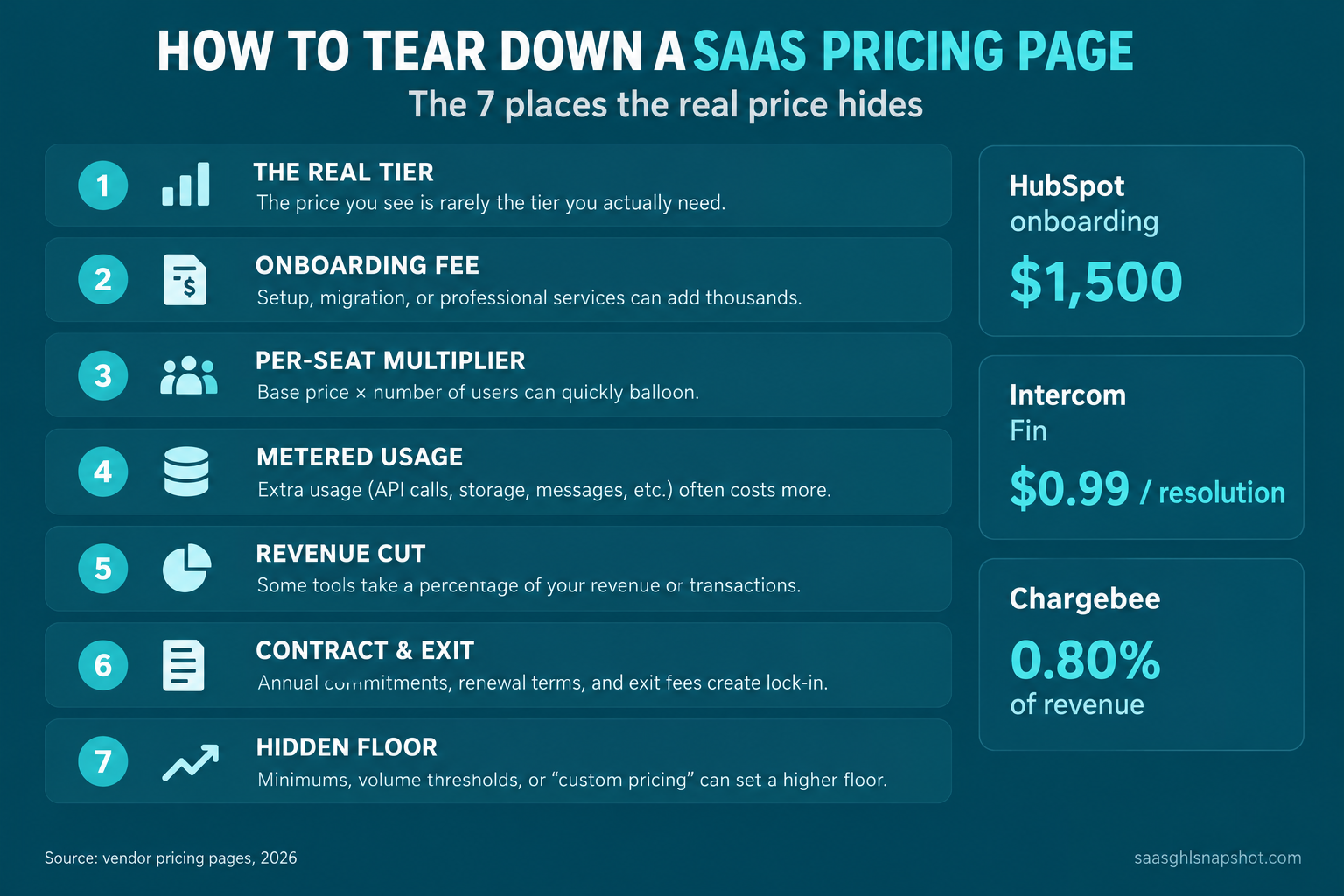
Table of contents
- Why the headline number is the one you should trust least
- The seven places the real price hides
- The teardown, checkpoint by checkpoint
- Steal this: the hidden-cost checklist
- Run the teardown at three company sizes
- The compliance cost no pricing page prices
- Objections
- FAQ
Why the headline number is the one you should trust least
A pricing page has one job: get you to start, not to tell you the total. So it leads with the lowest credible number and buries everything that scales with you. That matters more when growth is tight: median growth for private B2B SaaS was about 22% in 2026, down from 25% in 2024, with 7.3% of companies reporting flat or negative growth (SaaS Capital). A stack that compounds faster than revenue is how you quietly go underwater.
Three examples set the shape. HubSpot Sales Hub renders a Starter price near $7 a seat, but the tier most teams run, Professional, carries a mandatory $1,500 onboarding fee that never appears on the slider (HubSpot pricing). Intercom lists tidy per-seat prices, then bills its Fin AI agent at $0.99 per resolution on top, so a busy desk pays more for AI than for seats (Intercom pricing). Chargebee markets a $0 free plan that takes 0.80% of your billing past about $66K a month, so “free” is not free once you grow (Chargebee pricing).
None of that is on the sticky note. All of it is on the invoice.
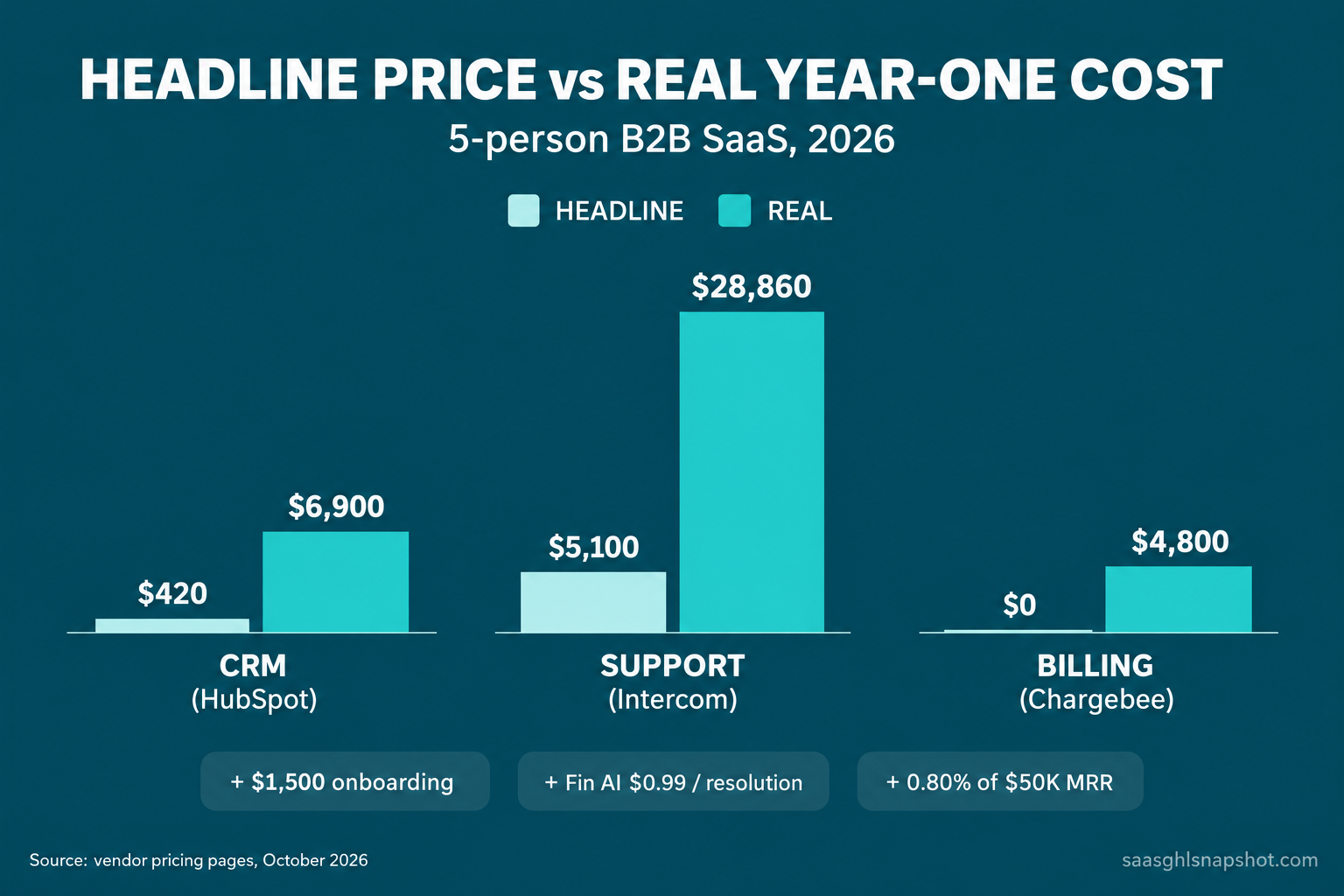
The buried line item, annualized: HubSpot’s $1,500 one-time onboarding fee, Chargebee’s 0.80% cut at $50K MRR ($400 a month), and Intercom’s Fin AI at $0.99 across 2,000 resolutions a month. None appear on the headline price. Source: HubSpot, Chargebee and Intercom pricing pages, October 2026.
The seven places the real price hides
Every teardown follows the same seven checkpoints, whether you run them on a CRM, a billing tool, a support desk, or an email platform:
- The real tier you will run in month three, not the banner promo.
- The onboarding fee, a one-time setup charge attached to the useful tier.
- The per-seat multiplier: headline price times your team times twelve.
- Metered usage: per-contact, per-message, per-resolution, per-event overages.
- The revenue cut, a percentage of billing skimmed on top of a base fee.
- The contract and the exit: annual lock-in and data-export friction.
- The hidden floor, tiers priced only behind “contact sales.”
The first three catch most of the gap; the last four hurt a year in.
The teardown, checkpoint by checkpoint
1. Find the tier you will actually run
The banner price is almost always a starter tier missing the feature that made you shop: real automation, sequences, deeper reporting, or more than two seats. So ignore it and ask which tier has the thing you came for. That is your real starting price. HubSpot’s $7-to-$20 Starter line is stripped of the sequences most teams need, so the honest tier is Professional at around $90 a seat (HubSpot pricing). Attio does the reverse, running a real CRM free for up to three seats, so a tiny team starts at $0 (Attio pricing).
How it breaks: you price the starter tier, get budget approved, then find in week three you need the next tier up. Fix it by pricing the tier with your must-have feature first.
2. Hunt the onboarding or implementation fee
This is the most common buried cost in B2B SaaS, and the maddening part is that it is usually published, just not on the slider. A one-time onboarding or implementation fee attaches to the tier that matters and lands in year one. HubSpot Professional requires a $1,500 fee, Enterprise $3,500, described as required on its own page (HubSpot pricing). On a $5,400 annual seat spend, that is a 28% year-one surcharge nobody put on the sticky note. The full math is in the HubSpot Sales Hub pricing teardown.
How it breaks: you compare monthly per-seat prices, pick the cheaper one, and eat a four-figure setup fee. Fix it by adding every one-time fee into the year-one total first.
3. Do the per-seat multiplication yourself
Per-seat pricing feels small because it is quoted small. The page says “$90 a seat” because “$10,800 a year” would scare you. So do the multiplication the page avoided: price times headcount times twelve, plus the seats you will hire this year. A $90-a-seat tool is $1,080 at one seat and $10,800 at ten, growing with your org chart whether or not revenue keeps pace. This is how the tool bill outruns revenue (the real cost of your GTM stack).
How it breaks: you approve a per-seat tool at today’s headcount, double the team, and the renewal doubles. Fix it by pricing at projected end-of-year headcount.
4. Read the metered usage billing twice
Usage-based billing hides modern SaaS’s fastest-growing cost, because it scales with your success, not your headcount. Look for anything billed per contact, email, message, event, or AI resolution, then model it at the volume you will actually hit, not the free allotment. Intercom is the sharpest 2026 example: seats run $29 to $132, but its Fin AI agent bills $0.99 per resolution on top (Intercom pricing). At 2,000 resolutions a month that is $23,760 a year, dwarfing the seat cost (what Intercom Fin actually costs). Customer.io is murkier: its upper tiers are custom, and it bills roughly $0.009 per extra profile and $0.12 per thousand extra emails, so the real cost tracks list size and send volume (Customer.io pricing; our lifecycle email without Customer.io Premium guide).
How it breaks: you sign up at a usage that fits the free tier, grow, and the overage line becomes your biggest SaaS invoice with no new seats. Fix it by modeling metered cost at projected 12-month volume and getting the per-unit rate in writing.
5. Spot the percentage-of-revenue cut
Billing and payment tools take a percentage of your money on top of a base fee. A percentage feels harmless at launch and becomes your largest vendor cost as you scale, because it grows one-to-one with revenue. Chargebee’s free plan is marketed at $0 but takes 0.80% of billing above a roughly $66K monthly threshold; its paid plan moves to $99 a month plus 0.65%, and Enterprise, RevRec and CPQ are quote-only (Chargebee pricing). At $50K MRR, 0.80% is $4,800 a year for the “free” plan. We run it against Stripe Billing across MRR bands in what subscription billing really costs at $50K MRR.
How it breaks: you pick the percentage model for its low base fee, cross the revenue level where a flat fee would be cheaper, and keep paying because switching billing systems is terrifying. Fix it by computing the crossover revenue before you sign.
6. Price the contract and the exit
Two costs live in the fine print: how long you are locked in, and how hard it is to leave. The cheapest monthly price almost always requires an annual commitment you cannot shrink mid-term, so a seat you add in month two you pay for through month twelve. The exit is worse because it is invisible until you try: core records export cleanly, but deal history, timelines, and custom-object relationships break on the way out. That portability is the real lock-in, and it is why we wrote how to migrate off HubSpot without losing deal history.
How it breaks: you commit annually for the discount, your needs change in month four, and you pay for eight months of a tool you already replaced. Fix it by pricing the annual discount against the option value of monthly billing, and testing an export first.
7. Count the tiers behind “contact sales”
The last checkpoint is what the page refuses to show you. When a tier or product line is priced only behind “contact sales,” treat it as a signal, not a gap: the price is high enough that a number would cost them the click, and it is negotiable. Chargebee’s Enterprise, RevRec and CPQ products are quote-only, as are HubSpot and Attio Enterprise and Customer.io’s upper tiers. The opacity is not the scandal; the buried costs in checkpoints two and four hurt a small team sooner. But a quote-only tier tells you to budget a range, get the number in writing, and never assume the demo price is the floor.
How it breaks: you plan around a visible tier, outgrow it, and find the next step up is a five-figure annual contract. Fix it by asking for the quote-only price early, so you see the whole staircase.
Steal this: the hidden-cost checklist
Keep this next to every pricing page you evaluate. Write a number on every line, and compare vendors on the year-one total, never the banner. Copy it verbatim.
The real tier
- Which tier has the feature I came here for? That is my starting price, not the banner.
- Is the banner a promo that reverts, or annual-only? Write the real reverted and monthly prices.
The one-time fees
- Any onboarding, implementation, setup, or migration fee? Add it to year one.
- Required or optional? If required, it is a surcharge, not a line you can skip.
The per-seat math
- Headline price times headcount times twelve, now and at projected end-of-year headcount.
- Are any roles (viewer, admin, read-only) free or cheaper? Note which.
The metered usage
- What is billed per unit: contact, email, message, event, resolution, API call?
- Free allotment versus projected 12-month volume, times the per-unit rate. Write the annual number.
The revenue cut
- Any fee that is a percentage of billing or revenue? What is it in dollars at my projected revenue?
- At what revenue does a flat-fee competitor become cheaper? Write the crossover.
The contract and exit
- Minimum term, mid-term downgrade rules, notice period, auto-renewal?
- Can I export contacts, history, and relationships cleanly? Test it on a trial.
The hidden floor
- Which tiers are “contact sales” only? Get the next tier’s quote in writing. It is negotiable.
The verdict line
- Year-one total = real tier annual + one-time fees + metered overage + revenue cut. Compare only that.
Run the teardown at three company sizes
The seven checkpoints are universal, but the line that bites changes with your size.
The solo operator or 2-to-3-person team. Your killers are checkpoints one and two. Revenue percentages do not bite yet and your usage sits inside free allotments. What wrecks a tiny budget is signing a $90-a-seat tier with a $1,500 setup fee when a $0 tier (Attio free to three seats) would have carried you a year. Price the real tier, refuse the setup fee, and stay month-to-month so a wrong bet costs thirty days.
The 5-person team (most readers here). All seven are live, and the per-seat multiplier is usually the biggest number. Five seats at $90 is $5,400 a year before a single overage, and you are probably hiring, so price eight seats, not five. Metered billing also stings: at $0.99 per AI resolution, a busy support desk can pass your entire seat cost. Model seats and your largest metered line at projected volume.
The scaling team ($3M ARR and up). Your killers move to the back half: the revenue cut, the contract, and the hidden floor. A 0.80% billing cut is now real money, annual contracts lock in spend you may not need, and the quote-only Enterprise tiers you ignored are the ones you are pushed toward. Get every quote in writing, compute the flat-fee crossover, and negotiate.
Headline price against real year-one cost for a 5-person B2B SaaS. CRM: HubSpot Starter banner ($7 x 5 x 12) against Professional at $90 a seat plus the $1,500 onboarding fee. Support: Intercom at $85 a seat against the same seats plus Fin AI at $0.99 across 2,000 resolutions a month. Billing: Chargebee’s $0 plan against its 0.80% cut at $50K MRR. Source: HubSpot, Intercom and Chargebee pricing pages, October 2026.
The compliance cost no pricing page prices
Here is the cost on nobody’s pricing page: the legal and deliverability work every lifecycle tool assumes you already did. A pricing page sells the ability to send email and texts; it does not make that sending legal, and the gap is yours to close.
CAN-SPAM governs every lifecycle and sales email you send in the US: a physical address in the footer, a working unsubscribe, honest subject lines (FTC CAN-SPAM guide). Google and Yahoo bulk sender rules, in force since February 2024, require SPF, DKIM and DMARC, a spam-complaint rate under 0.30%, and one-click unsubscribe for anyone sending 5,000 or more messages a day (Google guidelines). GDPR applies the moment an EU trial signup lands, CCPA and CPRA cover California residents, SOC 2 is a sales blocker rather than a law, and A2P 10DLC applies the moment you send marketing texts. None of it is on the pricing page, but all of it is a cost of running the tool, so price the setup time in. We cover it in our email deliverability and compliance guide.
Objections
“This is a lot of work for a software purchase.” The full sheet takes about ten minutes per vendor, for a tool you will keep for years. Against a multi-year, four-or-five-figure commitment, it is the best-paid half hour in your week, and the ten-minute version above catches most of the gap.
“Vendors will just give me a custom quote anyway.” Good, that is checkpoint seven working. A custom quote means the price is negotiable, to your advantage once you know the staircase. The teardown lets you walk in knowing the published tiers cold, so the rep cannot anchor you.
“Our biggest cost is the tools, so I should cut tools.” Usually not. For most B2B SaaS, the tool bill is a fraction of the revenue leaking between a trial signup and a renewal. Tearing down pricing pages stops you overpaying, but the larger number is the churn and failed-payment revenue you are not recovering. Fix the leak first, then trim the stack.
Who this teardown is for
Run this before every SaaS purchase, and especially before any renewal, where auto-increases and quietly-added seats hide. Pair it with the best CRM for founder-led sales comparison and Attio vs HubSpot for a small B2B SaaS for CRM decisions, and with the real cost of your GTM stack for the whole stack. The money is not saved on the pricing page. It is saved by never again budgeting from the banner number.
What is the fastest way to find the real cost of a SaaS tool?
Do three lines. Price the tier that has the feature you came for, not the banner promo. Add every one-time fee, like onboarding, into the year-one total. Then model the largest metered line (seats, resolutions, or a revenue percentage) at your projected 12-month volume. Those three catch most of the gap between the headline price and the invoice.
Why do SaaS companies hide onboarding and setup fees?
They are not usually hidden, just kept off the per-seat slider so the headline stays low enough to start a trial. HubSpot, for example, publishes a required $1,500 onboarding fee on Sales Hub Professional and $3,500 on Enterprise, but neither shows on the slider. Always add one-time fees into the year-one total before comparing vendors.
Is usage-based pricing cheaper than per-seat pricing?
It depends on your volume. Usage-based billing, like Intercom's $0.99 per Fin AI resolution or Customer.io's per-profile and per-email overages, is cheap at low volume and can become your largest invoice at scale with no new seats. Model the per-unit rate against projected 12-month volume before assuming it is cheaper.
What does 'contact sales' pricing usually mean?
It usually means the price is high enough that a number on the page would cost the vendor the click, and that the price is negotiable. Treat a quote-only tier as a signal to ask for the number in writing early, budget a range, and never assume the first demo price is the floor.
How do I compare two SaaS tools with different pricing models?
Convert both to a single year-one total: the real tier's annual price, plus every one-time fee, plus projected metered overage, plus any revenue-percentage cut at your projected revenue. Compare only that total. The banner price, the per-seat number, and the 'free' label should never enter the comparison. A slightly pricier tool you can leave on thirty days' notice can still beat a locked annual contract you outgrow in month four, so weigh the exit too.