

It is the end of the quarter and you are reconciling the card. There are nine SaaS charges that all touch go-to-market, and you cannot remember approving three. The CRM went up because you added a seat. Intercom has a usage line you do not recognize. The billing tool now takes a cut of revenue. Your all-in cost is not the sum of the sticker prices, because per-seat pricing, usage billing, and one-time fees all move independently of your plan. This post gives you the spreadsheet to add it up honestly, three worked scenarios, and a map of where the money hides. Every number is list price at the time of writing (September 2026); confirm each on the vendor’s page before you budget.
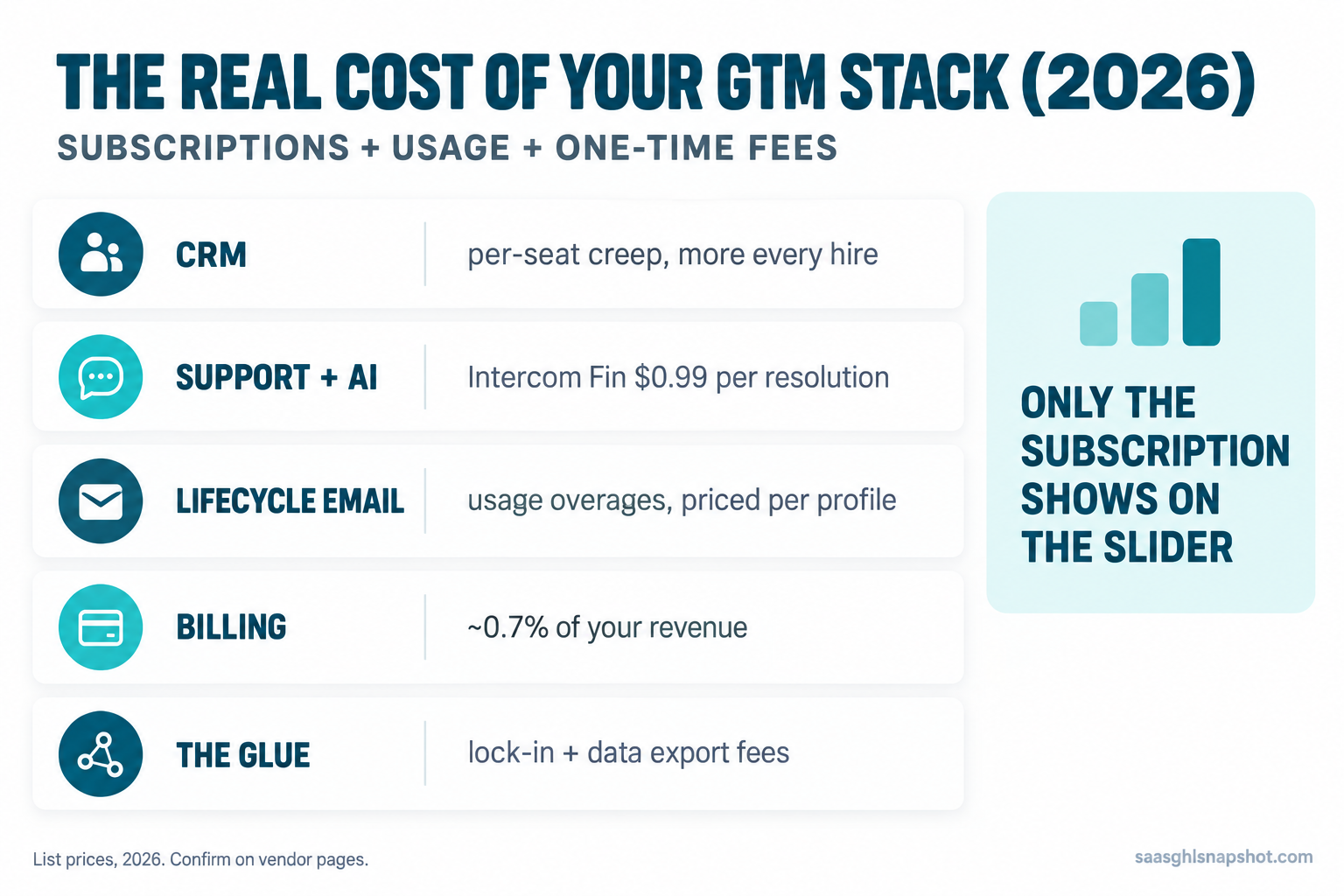
Table of contents
- Key takeaways
- Why the sticker price is never the real number
- What tool sprawl costs you right now
- The five categories in a GTM stack
- Category 1: the CRM
- Category 2: support and AI
- Category 3: lifecycle email
- Category 4: billing
- Category 5: the glue
- Three cost scenarios
- Steal this: the GTM stack cost spreadsheet
- The compliance cost buried in deliverability
- Objections
- FAQ
- Sources
Key takeaways
- Your real GTM cost is subscriptions plus usage plus one-time fees. Only the first shows on the pricing slider; the other two move on their own.
- Per-seat pricing scales against you. Every hire adds cost to a tool that just serves one more login.
- Usage billing is the ambush. Intercom’s Fin AI bills roughly $0.99 per resolution, so 2,000 resolutions a month is about $23,760 a year on top of seats (Intercom pricing).
- Revenue-percentage pricing compounds. Billing tools take a cut of billed revenue, roughly 0.65% to 0.80%, so they get pricier as you succeed (Chargebee pricing).
- Build the spreadsheet below once: it turns nine mystery charges into one number and shows the tool to cut.
Why the sticker price is never the real number
You shop tools by comparing monthly prices. That is the wrong unit. Modern GTM tools price on three axes at once, and only one is on the page you looked at. The subscription is per seat, the number on the slider. Usage is per resolution, per profile, per thousand emails. One-time fees are onboarding, implementation, data export. A tool can look cheap on the first axis and cost triple on the other two, so a cheaper tool with a mandatory fee can lose to a pricier one with none. You cannot see that from the slider.
This is not abstract for a bootstrapped team. Median growth for private B2B SaaS slipped to about 22% in 2026, down from 25% in 2024, with 7.3% of companies reporting flat or negative growth (SaaS Capital, 2026 Private B2B SaaS Growth Rate Benchmarks), and median CAC payback has lengthened since 2022 (Benchmarkit, 2025 B2B SaaS Benchmarks). When growth slows, the tool bill is one of the few lines you fully control.
What tool sprawl costs you right now
Tool sprawl is not just the dollar total. It is the cost of not knowing it. Three failure modes run quietly on most stacks.
You pay for seats nobody uses. A rep leaves, the seat stays; across every per-seat tool that is a standing tax on churn you already absorbed.
Usage lines drift with no ceiling. A ticket spike, a big send, a burst of trial signups: each moves a meter you are not watching, and the bill arrives a month late.
Overlap is invisible. Your CRM, lifecycle tool, and support tool all send email. You pay two or three vendors for one job because each crept into the next one’s lane.
The five categories in a GTM stack
Almost every early-stage B2B SaaS go-to-market stack is five jobs, whatever the logos: CRM (deals and pipeline), support and AI (answering customers), lifecycle email (onboarding, activation, dunning), billing (subscriptions and failed payments), and the glue (integrations between them). For each the question is the same: what is the subscription, what is the usage, what is the one-time fee, and how does it break.
Category 1: the CRM, where per-seat pricing bites
The CRM is where per-seat pricing does the most damage, because everyone touches it and every login is a line item. Here is the 2026 landscape, list price at the time of writing (confirm on the vendor page, since CRM pricing shifted across 2025 and 2026).
| CRM | Entry paid tier | Team tier | One-time fee | Free plan |
|---|---|---|---|---|
| Attio | $35/user/mo Plus | $79/user/mo Pro | None | Yes, up to 3 seats |
| Close | $9/mo Solo (1 user) | $99/user/mo Growth | None | No |
| HubSpot Sales Hub | $15/seat/mo Starter | $100/seat/mo Professional | $1,500 Pro / $3,500 Enterprise | Yes, limited |
| Pipedrive | ~$14/seat/mo | ~$49/seat/mo | None | No |
Sources: Attio pricing, Close pricing, HubSpot Sales Hub pricing, Pipedrive pricing.
The number that ambushes people is HubSpot’s onboarding fee: Sales Hub Professional carries a mandatory one-time $1,500 charge in year one, Enterprise $3,500, and you cannot decline it (HubSpot Sales Hub pricing guide). The honest first-year comparison is seats times price plus that fee, which never shows on the slider. Full math: what HubSpot Sales Hub actually costs in 2026.
How it breaks. Per-seat CRM pricing turns hiring into a recurring cost with no matching benefit. Ten people on a $100-a-seat plan is $12,000 a year for a database that does exactly what it did at three seats: it gets pricier as you grow, which is backwards. For picking a CRM you will not outgrow, see the best CRM for founder-led sales in 2026.
Category 2: support and AI, where usage billing hides
Support is where usage billing does its quiet damage. Intercom lists per-seat plans at roughly $29, $85, and $132 per seat a month. That is what you compare. What you do not is the Fin AI agent, billed at $0.99 per resolution (Intercom pricing). A resolution is a conversation Fin closes on its own, so the better the AI performs, the more you pay, with no seat cap in sight.
At 2,000 resolutions a month, Fin costs $1,980 a month, or $23,760 a year, sitting entirely on top of seats. That single line can dwarf your CRM, billing tool, and email platform combined. We break it down in what Intercom’s Fin AI actually costs.
How it breaks. Usage billing has no ceiling you control. A launch or a bad release drives ticket volume up, Fin closes more conversations, and the bill climbs in the exact month you can least afford it. Budget usage lines at your peak, not your average, and set a billing alert.
Category 3: lifecycle email, where the price is not published
Lifecycle email is priced on a meter you do not watch. Customer.io prices on profiles, not seats. It publishes an entry tier (around $100 a month for Essentials) and negotiates higher volume tiers, but the figures that actually move your bill are the overages: roughly $0.009 per extra profile and $0.12 per thousand extra emails beyond your plan (Customer.io pricing). The number you budget is a floor, not a ceiling, and it moves every time your contact list grows.
How it breaks. Profile-based pricing punishes list growth, and most founders never prune. Dead trials, churned accounts, and duplicates all count as profiles and all bill, so you pay to store the people not paying you. The fix is a list-hygiene routine that suppresses dead profiles on a schedule. For running lifecycle sequences without the premium price, see SaaS lifecycle marketing.
Category 4: billing, where they take a cut of revenue
Billing is the only category that scales directly with revenue, so it hurts most as you win. Chargebee starts with a free tier, then takes a percentage of billed revenue on paid plans, roughly 0.65% to 0.80% depending on tier and volume (Chargebee pricing); its Enterprise, RevRec, and CPQ tiers hide their prices behind a demo. Stripe Billing prices at around 0.7% of billing volume on top of standard processing fees (Stripe Billing pricing). Confirm the current thresholds, because both re-priced recently.
The percentage looks small until you scale it. At $50,000 MRR, 0.7% is $350 a month, or $4,200 a year, just to send invoices and retry failed cards; at $200,000 MRR it is $1,400 a month.
How it breaks. Revenue-percentage pricing is a growth tax that is painless at $5,000 MRR and painful to unwind at $200,000 once it is wired into your ledger. Model the cost at your 18-month revenue target, not today’s. If failed payments are why you are shopping, the recovery playbook is in failed-payment dunning.
Disclosure: the link above is a GoHighLevel affiliate link. We may earn a commission if you sign up, at no extra cost to you.
Category 5: the glue, integrations, exports, and lock-in
The glue is the category nobody budgets and everybody pays for: the automation tool holding your stack together, plus the exit costs in every contract. Platforms like Zapier price on tasks per month, so the more your stack talks to itself, the more the plumbing costs. Then come the exit costs that appear only when you try to leave: data export charges, annual contracts you cannot break mid-term, and API limits that slow a clean migration. None show on the pricing page.
How it breaks. Lock-in is a cost you pay at the worst moment, once you have already decided the tool is not working, and an annual contract keeps billing for months. Get the export path and cancellation terms in writing first. If your stack has already sprawled, the consolidation path is in migrating off tool sprawl.
Three cost scenarios: solo, five-person, fifteen-person
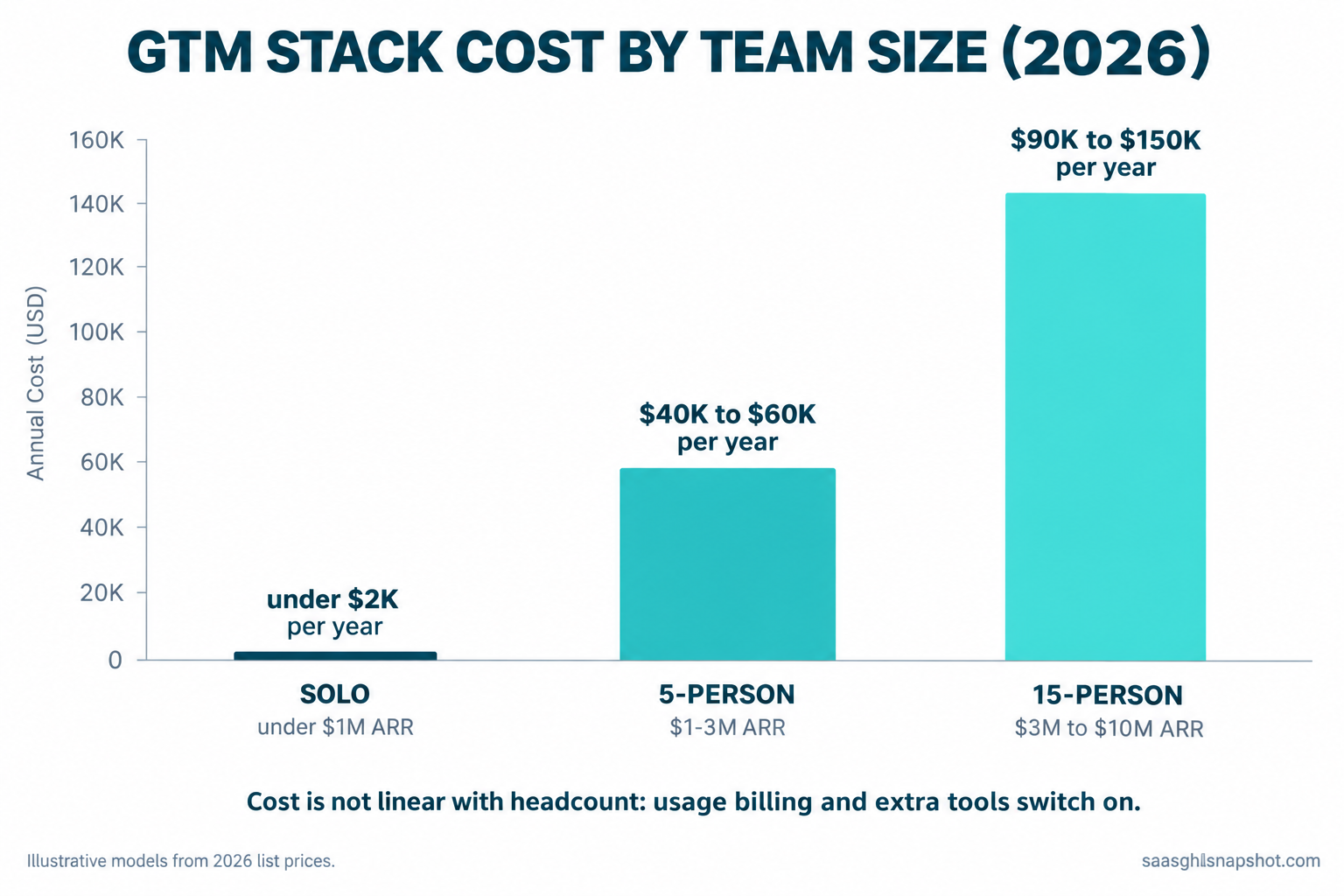
The same five categories cost wildly different amounts by size, and the shape of the bill changes too. These are illustrative models from the list prices above, not quotes.
Solo founder, pre-revenue to under $1M ARR. Per-seat pricing barely bites, so resist paid tiers you do not need. Attio free covers the CRM at $0, a shared inbox handles support, a basic email tool runs onboarding, Stripe Billing takes its small percentage, and a Zapier starter plan glues it together: under $150 a month plus payment percentages. The trap is buying enterprise tools for a one-person problem.
Five-person team, $1M to $3M ARR. This is where the bill jumps and usage billing takes over. Five CRM seats run $5,000 to $6,000 a year, plus onboarding if you chose HubSpot Professional. A few Intercom seats cost a few thousand, but Fin at 2,000 resolutions adds roughly $23,760, and profile-based email runs several thousand more. All-in, $40,000 to $60,000 a year, and the largest single line is often the AI usage meter, not the CRM.
Fifteen-person team, $3M to $10M ARR. Per-seat pricing compounds: fifteen CRM seats is $18,000 or more before fees, support and Fin resolutions scale with headcount, and billing on a bigger revenue base is real money. All-in, commonly $90,000 to $150,000 a year. Note the shape: solo to five-person is not five times the cost, it is roughly twenty-five times, because usage billing and extra tools switch on.
Steal this: the GTM stack cost spreadsheet
Build this once and stop wondering what your stack costs. Every column catches a cost the slider hides.
Tool | Category | Billing model | List price | Seats or units | Monthly subscription | Usage this month | One-time fee (amortized /12) | Annual all-in | % of revenue? | Contract end date | Export costOne row per tool. The formulas:
Monthly subscription  = list price x seats
Usage this month      = usage rate x actual volume  (resolutions, profiles, emails)
One-time fee /12       = onboarding or setup fee divided by 12
Annual all-in         = (monthly subscription + usage + fee/12) x 12
Total stack cost      = SUM of every row's annual all-in
Cost as % of ARR      = total stack cost / current ARR
That last line is the one to watch: when your stack cost climbs as a share of ARR quarter over quarter, your tool bill is outrunning revenue. Then run this eight-question audit before you renew or buy, and send it to the vendor:
1. Priced per seat, per usage, or flat? If per seat, what does each new seat add?
2. What is the usage rate, and my bill at 2x my current volume?
3. Any one-time onboarding or setup fee, and is it mandatory?
4. Does the price take a percentage of my revenue? At what threshold?
5. Monthly vs annual cost? (Monthly often runs 20-35% more.)
6. Can I export all my data, and is there a charge to do it?
7. Contract length, and can I cancel mid-term or only at renewal?
8. Which of my other tools already does part of this job?
Question eight finds the money. Most sprawl is two tools paying for one job. List all five categories on one sheet and the overlap is obvious; the cheapest tool is usually the one you delete. No time for the full sheet? Tag every charge on your last card statement with a category, then act on two flags: any category with two or more tools, and any usage line larger than your biggest subscription.
The compliance cost buried in deliverability
There is a cost that is not on any invoice: your email not arriving. Since February 2024, Google and Yahoo require bulk senders (5,000 or more messages a day) to authenticate with SPF, DKIM, and DMARC, keep the spam complaint rate under 0.30%, and offer one-click unsubscribe via the List-Unsubscribe-Post header (Google email sender guidelines). Miss those and your onboarding and dunning sequences silently land in spam, a cost that shows up as churn, not a line item.
CAN-SPAM governs every lifecycle email, GDPR applies the moment an EU trial signup lands, and CCPA and CPRA cover California data. SOC 2 is not a law but is a sales blocker for enterprise deals. The hidden cost is the consolidation trap: across four vendors, keeping authentication, consent, and suppression consistent gets harder, so the cheapest way to stay compliant is usually fewer tools.
Objections
“Cheaper tools are worse tools.” Not the way you think. The expensive tool is rarely better at the core job, just at features you may not use yet. A $100-a-seat CRM and a $35-a-seat CRM both store contacts and pipeline fine; the premium buys reporting and permissions you will grow into, or not. Buy for the problem you have.
“Consolidating is risky, I will lose data.” Migration is real work, and rushing it does lose deal history. That is an argument for planning the move, not staying sprawled forever: map the data first and cut one category at a time. The careful version is in migrating off HubSpot without losing your deal history.
“Won’t a flat-rate tool just have its own catch?” Fair. The catch is you have to use enough of it to beat the per-seat math, and break-even is usually a handful of seats or one heavy usage line. Run your numbers with the flat-rate option as one row and see where the lines cross.
Frequently asked questions
How much does a go-to-market software stack cost for an early-stage SaaS company?
As illustrative 2026 models: a solo founder can run a real stack for under $150 a month plus payment percentages, a five-person team commonly lands at $40,000 to $60,000 a year, and a fifteen-person team at $90,000 to $150,000. For a growing team the biggest single line is often a usage meter like Intercom's Fin AI, not the CRM.
Why is my SaaS tool bill growing faster than my revenue?
Three reasons stack up: per-seat tools cost more every time you hire, usage-billed tools (Intercom Fin at $0.99 per resolution, profile-based email) climb with volume, and revenue-percentage billing rises with MRR. Track your stack cost as a share of ARR each quarter; if it is rising, cut or consolidate.
What are the hidden costs in SaaS pricing?
The four that catch founders most: mandatory onboarding fees (HubSpot Sales Hub Professional adds $1,500, Enterprise $3,500), usage billing with no ceiling (Intercom Fin at $0.99 per resolution), revenue-percentage pricing (roughly 0.65% to 0.80% of billed revenue), and exit costs like data export charges and annual contracts. None show on the slider.
Is per-seat or flat-rate pricing better for a small SaaS team?
Per-seat is cheaper with very few users and low usage. Flat-rate wins once you pass a handful of seats or carry one heavy usage line, because the cost stops rising as you scale. Model both and see where the totals cross.
How does Customer.io pricing work?
Customer.io prices on profiles, not seats. It publishes an entry tier (around $100 a month for Essentials) and negotiates higher tiers, but the figures that move your bill are the overages: roughly $0.009 per extra profile and $0.12 per thousand extra emails. Because it bills on profiles, list growth raises the cost, so pruning dead profiles lowers it.
Sources
- SaaS Capital, 2026 Private B2B SaaS Growth Rate Benchmarks
- Benchmarkit, 2025 B2B SaaS Benchmarks
- Attio pricing, Close pricing, HubSpot Sales Hub pricing and pricing guide, Pipedrive pricing
- Intercom pricing
- Customer.io pricing
- Chargebee pricing, Stripe Billing pricing
- Google email sender guidelines (bulk-sender rules)
About the author
Priya Venkatesan is a SaaS Growth and Revenue Analyst based in Seattle, WA. She lives in the numbers that matter, LTV/CAC, net revenue retention, cohort churn and payback period, and shows operators where cost structure and automation move the line on a P&L. Her writing pairs hard math with plain language, so it ends in a decision, not just a table.
Want your go-to-market stack costed and consolidated for you? Get the SaaS Snapshot or book a walkthrough. Related reading: what HubSpot Sales Hub actually costs, the best CRM for founder-led sales, and the 2026 SaaS benchmarks.