

HubSpot lets you leave. It just does not make it easy to take your deal history with you. Standard exports hand over contacts, companies, and deals as clean CSVs, but the timeline that holds your history, the notes, calls, emails, and meetings attached to each deal, does not come out through the export button. Get that wrong and you land in a new CRM with a list of names and no memory of why any of them matter. The fix is a written migration order: pick the destination, export the four objects, pull the timeline through the API, map the data model so associations survive, rebuild the automations by hand, then run both systems in parallel and reconcile before you cancel. Below are the six stages and how each breaks.
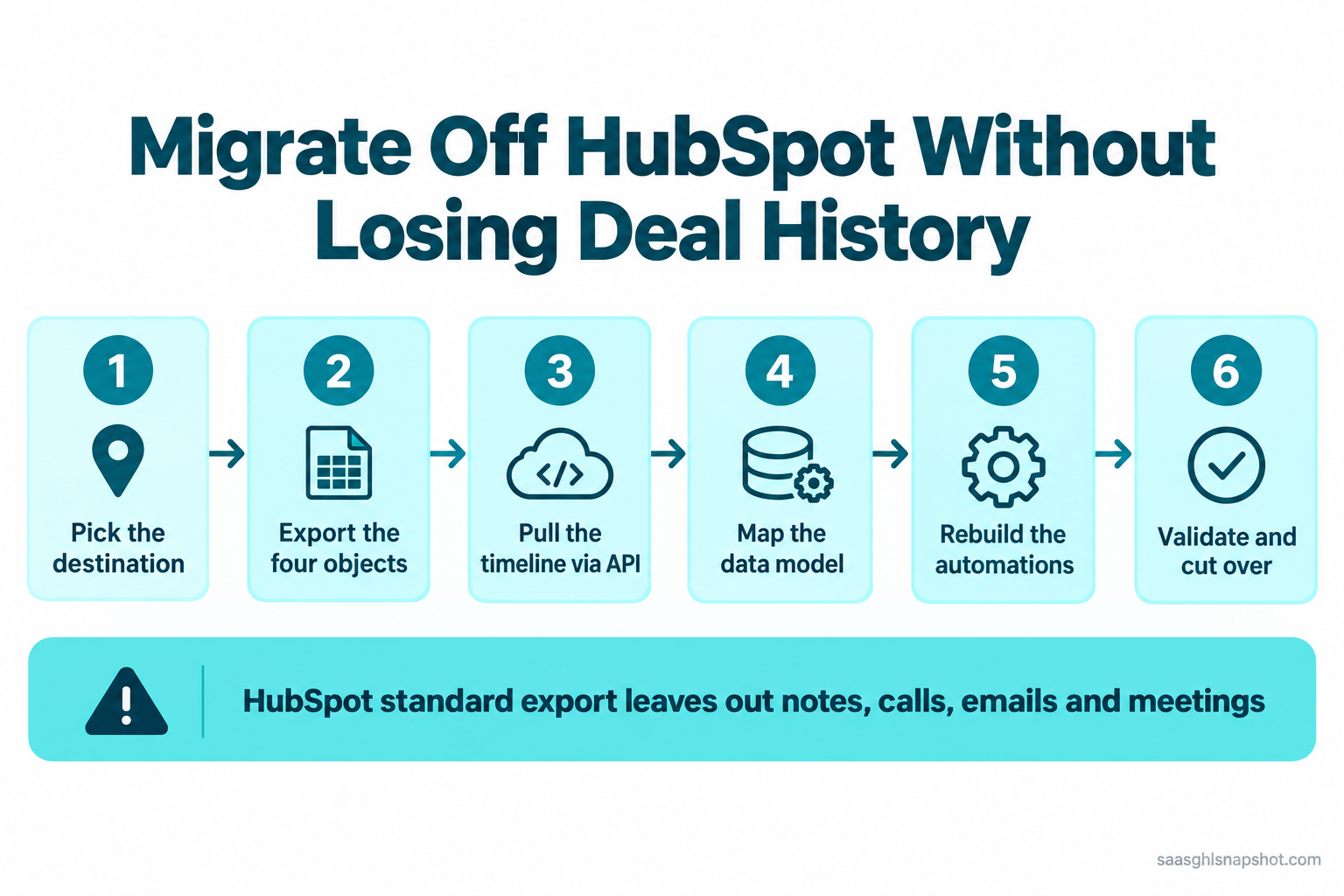
Table of contents
- What losing your deal history costs
- What HubSpot hands over, and holds back
- Stage 1: Pick the destination
- Stage 2: Export the four objects
- Stage 3: Pull the timeline HubSpot won’t give you
- Stage 4: Map the data model so associations survive
- Stage 5: Rebuild the automations
- Stage 6: Validate, run parallel, cut the cord
- Run it for three real teams
- The compliance layer
- Objections
- FAQ
What losing your deal history actually costs
Your deal history is the record of every conversation: the objection a prospect raised in March, the discount you floored at, the note that the decision maker is out until Q3. That context lets a founder-led team pick a stalled deal back up without starting from zero. Lose it in a migration and every open opportunity resets to a cold name, which lengthens your sales cycle just as you are trying to prove the switch was worth it.
The reason people migrate is usually cost. HubSpot Sales Hub Professional lists at $100 per seat a month billed annually, plus a mandatory $1,500 onboarding fee that never appears on the pricing slider (HubSpot Sales Hub pricing, corroborated by mo.agency’s 2026 breakdown). For a five-person team that is $7,500 in year one before you send an email; we broke it down in what HubSpot Sales Hub actually costs. Per-seat pricing punishes exactly what you are trying to do, grow the team.
When you are bootstrapped, every seat is your own money, and private B2B SaaS grew a median of about 22 percent in 2026, down from 25 percent in 2024 (SaaS Capital, 2026 Growth Rate Benchmarks). Here is the year-one bill for a five-seat team across the tools people migrate to, on list pricing.
Year-one cost (USD), 5-seat team, annual billing: HubSpot Pro $100/seat/mo + $1,500 onboarding; Close Growth $99/seat/mo; Attio Pro $79/seat/mo; GoHighLevel Unlimited $297/mo flat (no per-seat charge). Source: each vendor’s 2026 list pricing.
Trimming a per-seat bill is a legitimate lever on that math. Just do it without setting fire to the history.
What HubSpot hands over, and what it holds back
HubSpot’s standard export is generous with object records and stingy with everything attached.
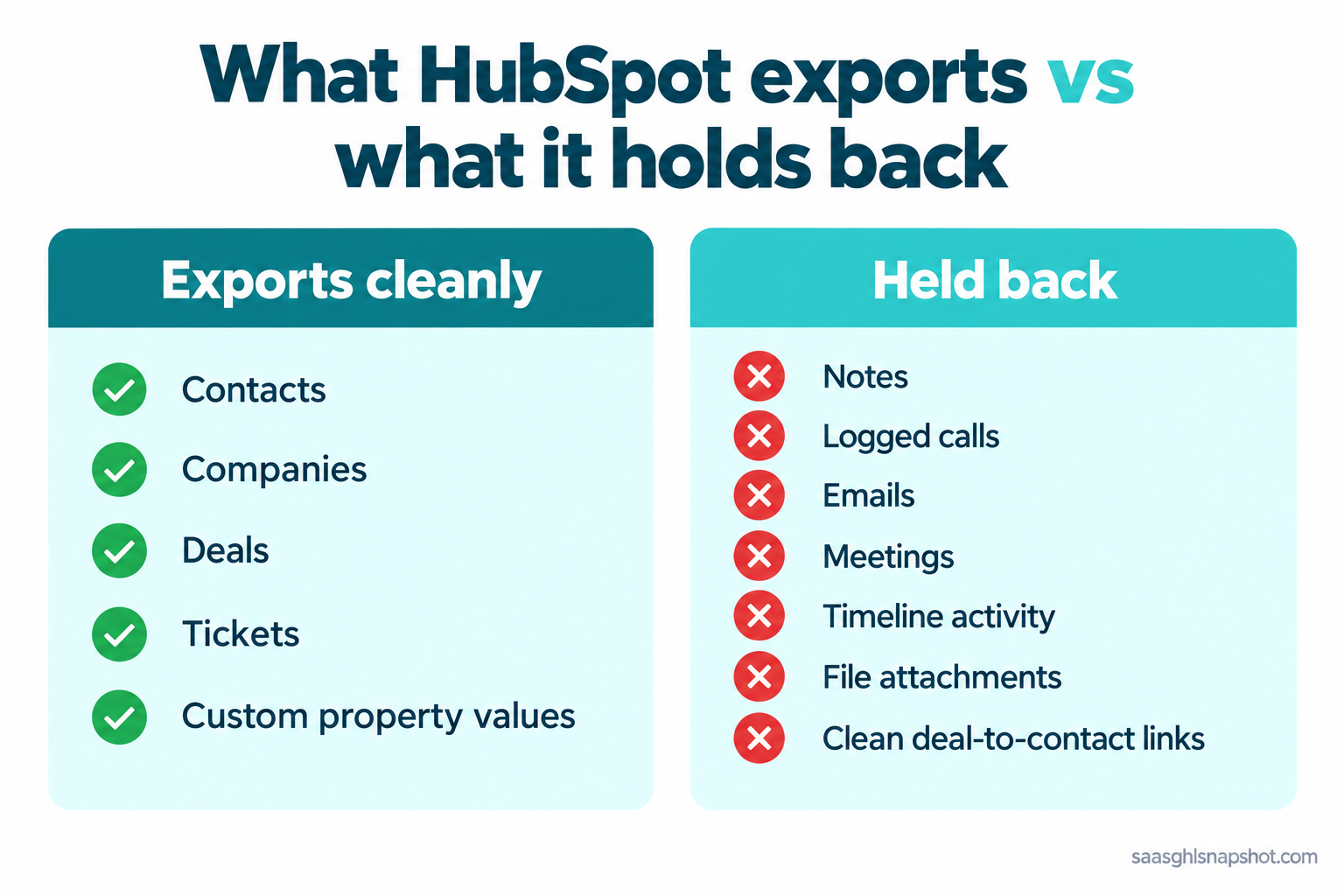
The in-app export gives you object records cleanly: contacts, companies, deals, and tickets, with current and historical property values. Two limits bite. Each export caps at 30 fields, so a wide record needs splitting and stitching back on record ID (Coefficient on the 30-field cap). And the CSV mangles multi-line text: line breaks inside a Notes field get read as new rows, silently corrupting your file.
What does not come out easily is the timeline. Engagements (notes, calls, emails, meetings) are attached to records but not included in a standard CRM export (NoteLinker on exporting HubSpot notes). Associations are exportable but awkward: linking exported deals back to their contacts in one file is a known pain. The clean CSV is your skeleton; the history and connective tissue need a different route, Stage 3.
Stage 1: Pick the destination before you export anything
Do not export anything until you know where it is going, because the destination decides your mapping. Founder-led B2B SaaS teams usually shortlist three. Attio’s flexible data model most closely mirrors HubSpot’s object structure, so contacts and companies map almost one to one. Close is built for founder-led outbound and keeps pipelines simple. GoHighLevel kills per-seat pricing entirely, charging a flat monthly rate regardless of seats, which is why it tends to win once a team crosses five or six people. We compared them in the best CRM for founder-led sales, and walked the consolidation story in migrating off tool sprawl.
The failure mode is picking on price alone, then finding the tool’s data model cannot hold your structure. Confirm the target supports your objects, custom fields, and pipeline stages first.
Stage 2: Export the four objects the right way
Now export one object at a time: companies, contacts, deals, tickets. Separate files stay clean and give you the record IDs you need to rebuild links later. From each object’s index page, filter to a view with the properties you want and export with “include all property values” and the association options on.
Watch the export limits: the in-app tool and the CRM Exports API are throttled, so a large account exporting repeatedly can hit a daily ceiling, not something to discover on cutover day (Skyvia’s export guide). And the failure mode here is trusting the file you did not open: a CSV with mangled notes or a silently truncated export looks fine until half your records land wrong. Reconcile row counts against your inventory every time.
Stage 3: Pull the timeline HubSpot won’t give you
This separates a real migration from a name dump. Because engagements are not in the standard export, you have three ways to get the history out.
Option A, the migration tool (best for most). Both Attio and Close use a migration engine (Import2) that connects to HubSpot through the API and pulls objects with their notes and activities together, associations intact. In Attio: Workspace settings, then Migrate CRM, choose HubSpot, and run a free sample migration before the full run (Attio’s guide). Close offers the same automatic import and maps your pipelines and stages during setup (Close’s guide). This is the route that carries your timeline.
Option B, the API export. If your destination has no prebuilt migration, pull engagements directly from the HubSpot API, which exposes notes, calls, emails, and meetings with their record IDs. Needs a developer, but it is the most complete.
Option C, the property workaround (partial). For a lightweight move, build a HubSpot workflow that copies note content into a custom text property on the deal, then export that with the standard CSV. You lose the thread but keep the headline context.
Stage 4: Map the data model so associations survive
Associations make a CRM more than a contact list: this deal belongs to that company, which has these three people on it. Preserve them by loading in dependency order, so a record exists before anything links to it: companies, then contacts, then deals, then line items, then tickets, then notes and activities last (Attio’s migration reference). Companies before contacts, so the contact-to-company link lands. Deals after both, so each attaches to a company and contact that already exist. Notes last, so they attach to records already in place. Flip the order and you get orphaned records: deals with no company, notes floating loose.
The failure mode is mapping fields but forgetting the match keys. If email and domain are not clean, the importer creates duplicates instead of linking. De-duplicate in HubSpot before you export, not after you import, when it is far harder to untangle.
Stage 5: Rebuild the automations, not just the records
Here is the part nobody warns founders about: your workflows do not migrate. Not to Attio, not to Close, not to GoHighLevel. The data moves; the automation logic does not, because every platform models triggers differently. Move records perfectly and skip this and you have a full database with a dead engine, so follow-ups, lifecycle emails, and internal alerts all just stop.
Treat automation as a rebuild, not a transfer. Use the automation inventory from Stage 1 as the build list and rank it: revenue-critical flows first (lead routing, trial-to-paid follow-up, failed-payment dunning), then the nice-to-haves. This is also the moment to delete the half-broken workflows you have meant to kill for a year. Our SaaS lifecycle marketing playbook maps the flows to prioritize.
The failure mode is a “big bang” cutover: you move the data and switch off HubSpot the same afternoon, before the new automations are tested. The pipeline goes quiet, nobody notices for a week, and trials churn while your dunning sequence sits half-built. Build and test the automations before you route live traffic through them.
Stage 6: Validate, run parallel, then cut the cord
Do not cancel HubSpot the day you finish importing. Run both systems in parallel for one to two sales cycles: new CRM as source of truth, HubSpot as a read-only safety net.
Reconciliation is where you catch the silent losses: deals in the wrong stage, notes that stopped importing after row 4,000, the automation that never fired. Only when the checklist is clean and the team has worked live for a cycle do you export one final backup, save it, and cancel.
The failure mode is cancelling to stop the bill before you have validated. The moment you cancel, that history is gone for good and any gap you find later is permanent. A month of overlap billing is trivial next to that.
Run the migration for three real teams
The stages are identical; the effort and destination shift with size.
| Solo founder (under $1M ARR) | 2-5 person team ($1-3M) | 10-15 person team ($3-10M) | |
|---|---|---|---|
| Data volume | Hundreds of records | Thousands | Tens of thousands |
| Timeline route | Migration tool sample run | Migration tool, full run | API export, dev-assisted |
| Best destination | GoHighLevel or Close Solo | GoHighLevel (flat pricing) | Attio or GoHighLevel |
| Automation rebuild | 3-5 core flows | 8-12 flows | Full lifecycle + routing |
| Parallel-run length | 2-3 weeks | One sales cycle | Two sales cycles |
| Biggest risk | Skipping validation | Broken associations | Automation gaps at scale |
Solo, your data is small enough that a sample run may cover most of it, so your only real enemy is skipping validation. Check the counts anyway. At 2-5 people the money argument is loudest: per-seat pricing is biting, and a flat-rate destination like GoHighLevel stops the bleed as you hire. At 10-15 you have real data volume and automation complexity, so budget a developer for the API export and run parallel for two full cycles.
The compliance layer you carry over with the data
Your contact records carry legal obligations, and those move with the data. Migration is not a reset on consent. None of this is legal advice.
Consent travels with the contact. If someone opted in under HubSpot, carry that state into the new CRM and honor every unsubscribe. Do not treat migrated contacts as a fresh list. CAN-SPAM still governs commercial email: a real address, a working unsubscribe, and honored opt-outs (FTC CAN-SPAM guide). Google and Yahoo bulk sender rules, in force since February 1, 2024, require SPF, DKIM, DMARC, a spam rate under 0.30 percent, and one-click unsubscribe at 5,000+ messages a day, so re-authenticate your domain before you send volume (Google sender guidelines). GDPR applies the moment an EU contact is in the file, including the right to erasure (GDPR overview); CCPA/CPRA cover California residents.
Objections
“Can’t I just export a CSV and import it?” You can, and you will move a contact list. What you lose is the deal history, the associations linking deals to companies and people, and every automation. Those three are the 80 percent that make a CRM worth having.
“I already pay for HubSpot and it works. Is migrating worth it?” If the tool fits and the bill is fine, stay. Migrate when the per-seat cost is scaling against you, when you are consolidating tools, or when you have outgrown the model. If it is only the bill, first read the full HubSpot pricing teardown.
“Do I need to be technical?” For a small account, no: the migration tools handle contacts, deals, and notes with a guided sample run and mapping screens. You need a developer only for a large API export or unusual custom objects. The non-technical work (inventory, mapping, validation) is what determines whether the migration succeeds.
“Won’t I lose my reporting history?” Your closed-deal records and dates come across, so you can rebuild historical reports. What does not migrate is HubSpot’s saved report and dashboard configurations; those are rebuilt like the automations. Snapshot your key dashboards before you cancel.
Finish the job before you cancel
It is the end of the quarter and the HubSpot renewal is looming. The temptation is to export, import, and cancel in an afternoon to stop the bill. Do not. Pull the timeline through the migration tool or the API, load objects in dependency order, rebuild your revenue-critical automations, run both systems in parallel for a cycle, and reconcile against your Stage 1 inventory. Then, and only then, cancel. Your deal history is the memory of your whole pipeline. Move it deliberately and you keep it.
Does HubSpot let you export your deal history?
It exports deal records (name, amount, stage, custom fields) as a CSV, but not the timeline. Notes, calls, emails, and meetings are engagements not included in a standard CRM export. To move that history, use a connected migration tool (Attio and Close both pull notes and activities through the HubSpot API) or a direct API export. A hand-uploaded CSV leaves your deal history behind.
What order should I import data into the new CRM?
Dependency order, so links survive: companies, then contacts, then deals, then line items, then tickets, then notes and activities last. This prevents orphaned records like deals with no company. Recreate all pipeline stages before importing deals, or every deal lands in the default stage.
Do HubSpot workflows and sequences migrate?
No. Your data moves; your automation logic does not, because every platform models triggers differently. Treat automation as a rebuild: inventory every active workflow, rank by revenue impact, and rebuild the critical ones (lead routing, trial-to-paid follow-up, dunning) first.
Should I cancel HubSpot as soon as the import finishes?
No. Run both systems in parallel for one to two sales cycles with the new CRM as source of truth. Reconcile counts, open-pipeline value, stages, history, associations, and automations, fix any mismatch, then export a final backup and cancel. Cancelling early makes any gap permanent.
Is it legal to email contacts after migrating them?
Yes, if you carry consent state with the data. Honor every existing opt-out, import your suppression list first, and re-authenticate your domain (SPF, DKIM, DMARC) before sending volume. CAN-SPAM requires a real address and a working unsubscribe; GDPR applies to any EU contact; Google and Yahoo rules apply at 5,000+ messages a day.
Sources
- HubSpot Sales Hub pricing and mo.agency’s 2026 breakdown: $100/seat Professional, $1,500 onboarding
- Coefficient, 30+ fields from HubSpot: the 30-field export cap
- NoteLinker, export notes from HubSpot: engagements not in standard export
- Skyvia, HubSpot export CSV guide: export limits and note handling
- Attio, migrate from another CRM: migration tool, load order, notes gap
- Close, migration from another CRM: automatic HubSpot import
- SaaS Capital, 2026 Growth Rate Benchmarks: median ~22% growth
- FTC CAN-SPAM guide, Google sender guidelines, and GDPR overview
Related reading: what HubSpot Sales Hub actually costs in 2026, the best CRM for founder-led sales, migrating off tool sprawl into GoHighLevel, and the SaaS lifecycle marketing playbook.