

At $50K MRR, Chargebee and Stripe Billing cost almost the same: Stripe Billing takes 0.7% of your recurring volume, about $350 a month, and Chargebee’s entry plan takes 0.80%, about $400 a month, both on top of the card-processing fee you already pay. Price is not the decision. The decision is what each one locks you into and how well it saves the payments that fail. Stripe Billing is cheaper and faster if you already run on Stripe. Chargebee is worth the premium if you need gateway choice, real revenue recognition, or a dunning engine you can actually tune. Here is the real 2026 math at three MRR levels, the eight things that differ, and the failed-payment math that dwarfs either fee.
It is the first of the month and your Stripe dashboard shows the recurring charges going out. Most clear. A handful decline: an expired card, a bank flag, a limit hit. Nobody notices, because nobody owns it. Three weeks later one of those accounts emails to ask why they lost access, and you realize you have been losing revenue to failed cards for months. That leak, not the monthly fee, should drive this choice.
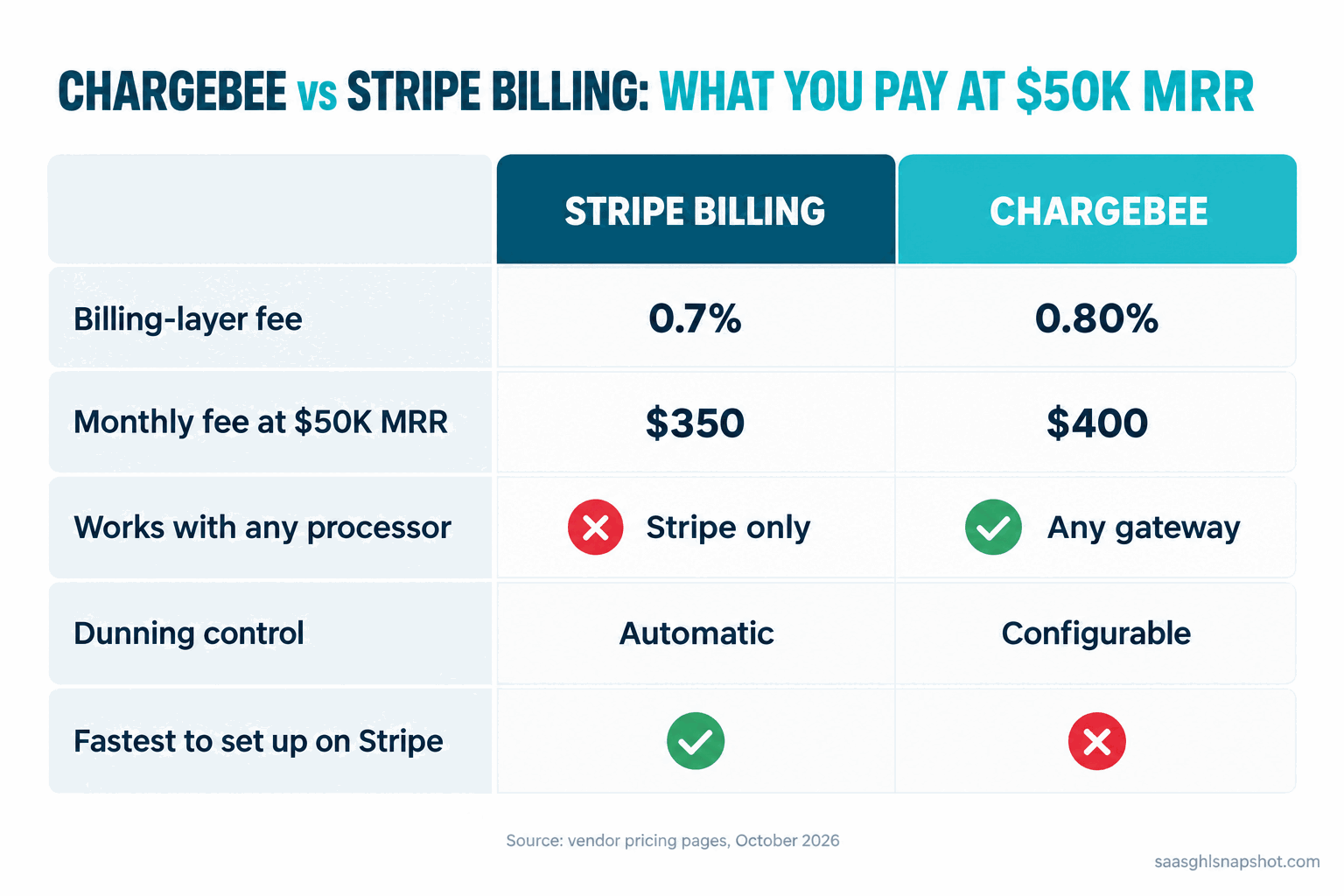
Table of contents
- Why the billing layer is a different decision than the processor
- The pricing, side by side
- The eight things that actually differ
- What it really costs at $10K, $50K and $200K MRR
- Steal this: the dunning sequence that recovers failed payments
- The compliance layer most teams skip
- Objections
- FAQ
Why the billing layer is a different decision than the processor
Clear up the thing that makes most comparisons wrong: these two products do not sit in the same slot.
Stripe Billing is a layer on top of Stripe the payment processor. You pay Stripe 2.9% plus 30 cents to move each card charge, then Stripe Billing adds its own percentage for managing the subscription: invoices, proration, retries, tax. Chargebee is not a processor at all. It is the subscription layer only, and it plugs into a gateway you choose: Stripe, Braintree, Adyen, or one of two dozen others. So with Chargebee you still pay a processor somewhere, and Chargebee takes its cut on top.
So the processing fee is roughly equal on both sides and cancels out. What you are really comparing is the subscription layer: Stripe Billing’s 0.7% against Chargebee’s 0.80% to 0.65%. When someone says “Stripe is cheaper,” check they are not confusing the billing layer with plain Stripe Checkout, which has no subscription logic at all.
The layer matters because it decides two things you cannot easily undo: which processor your card data lives with, and how much failed revenue you get back. Median growth for private B2B SaaS ran about 22% in 2026, down from 25% in 2024 (SaaS Capital, 2026 Growth Rate Benchmarks). When growth tightens, recovered revenue is the cheapest revenue you will ever add, because you already won the customer once.
The pricing, side by side
Real numbers from each vendor’s own pricing page, October 2026. Both reprice and geo-localize, so confirm on the live page before you commit a dollar.
| Stripe Billing | Chargebee | |
|---|---|---|
| What it is | Subscription layer on Stripe | Subscription layer, gateway-agnostic |
| Entry fee | 0.7% of recurring volume, pay as you go | 0.80% of billing volume below the $66K/mo breakeven |
| Mid tier | Pay monthly from $620/mo ($100K included, 0.67% over) | $99/mo plus 0.65% above the $66K/mo breakeven |
| Processing fee | Separate: 2.9% + 30c per card charge | Separate: your chosen gateway’s fee |
| Revenue recognition | Paid add-on | Paid add-on (RevRec) |
| Tax | Stripe Tax, paid add-on | Via Avalara or TaxJar, paid add-on |
| Forced annual contract | No on pay-as-you-go | No on the entry plan |
| Best for | Teams already on Stripe | Teams that need gateway choice or RevRec |
Both have no base fee at low volume, so a small account pays only the percentage. The two cross over near $66K of monthly volume on Chargebee: below it you pay 0.80% and no base; above it, $99 a month plus 0.65% (both land at $528 at the line) (Chargebee pricing). Stripe’s pay-monthly tiers start at $620 for the first $100K, then 0.67% above (Stripe Billing pricing), and only beat pay-as-you-go at high volume.
The eight things that actually differ
Price is a near tie. These eight are where the right answer depends on your business, not the sticker.
1. Which processor you are married to. Stripe Billing only works with Stripe as the processor. Chargebee’s subscription logic is separate from the gateway, so you can run more than one processor, or swap one out, without rebuilding billing. For most early teams Stripe’s single-processor simplicity is a feature; for a team with a real reason to fear single-vendor risk, gateway choice is worth the 0.1%.
2. Dunning and failed-payment recovery. This is the one that pays for the whole tool. Stripe’s own benchmark is that its recovery tools get back roughly 55% of failed recurring payments, and Smart Retries add about 9% more than a fixed schedule (Stripe revenue recovery docs). Chargebee gives you more knobs: configurable retry rules, cross-channel dunning, and account states you can wire into your product. Stripe’s is more automatic and less tunable. Want recovery to just happen? Stripe is enough. Want to design the exact cadence? Chargebee.
3. Revenue recognition. Once you raise money or sell to finance-heavy buyers, someone asks for ASC 606 rev-rec: recognizing a $1,200 annual plan as $100 a month, not up front. Both charge extra. Chargebee’s RevRec is built for messier, multi-entity books; Stripe’s is cleaner if your billing is already all inside Stripe. Pre-seed and nobody has asked? Add it when the need is real.
4. Tax. Sales tax and VAT are an add-on on both: Stripe Tax inside the Stripe stack, Chargebee via Avalara or TaxJar. Neither is free, and both earn their keep the moment you sell across state lines or into the EU. Budget for it as a line item regardless of which tool you pick.
5. How long it takes to ship. Stripe Billing wins on speed if you are already a Stripe shop: your customers and payment methods are already there, so turning on Billing is closer to a switch than a migration. Chargebee is a separate system you integrate and sync. A Stripe shop can be live in a day; Chargebee is usually a multi-week project.
6. Reporting and SaaS metrics. Both show MRR, churn, and basic analytics. Chargebee’s RevenueStory is more SaaS-native out of the box; Stripe gives you the dashboard plus Sigma for SQL access. Our 2026 SaaS benchmarks breakdown covers the churn and NRR bands to compare against.
7. Migration cost, in and out. Getting in is easy; getting out is where lock-in lives. Card numbers are held by the processor under PCI rules, so moving them is a compliant migration the losing vendor has no reason to speed up. With Stripe Billing, subscriptions and the card vault both live in Stripe, so leaving migrates both at once; with Chargebee, config and cards sit in different systems and move more independently. Before you sign, get each vendor’s full-export terms in writing.
8. Price at your actual scale. The sticker tie becomes a small gap that can flip. Below $66K monthly volume, Chargebee’s 0.80% is a touch more than Stripe’s 0.7%; above the breakeven, Chargebee’s $99 plus 0.65% can undercut Stripe. Price should be a tiebreaker, which is why the next section runs the real math.
What it really costs at $10K, $50K and $200K MRR
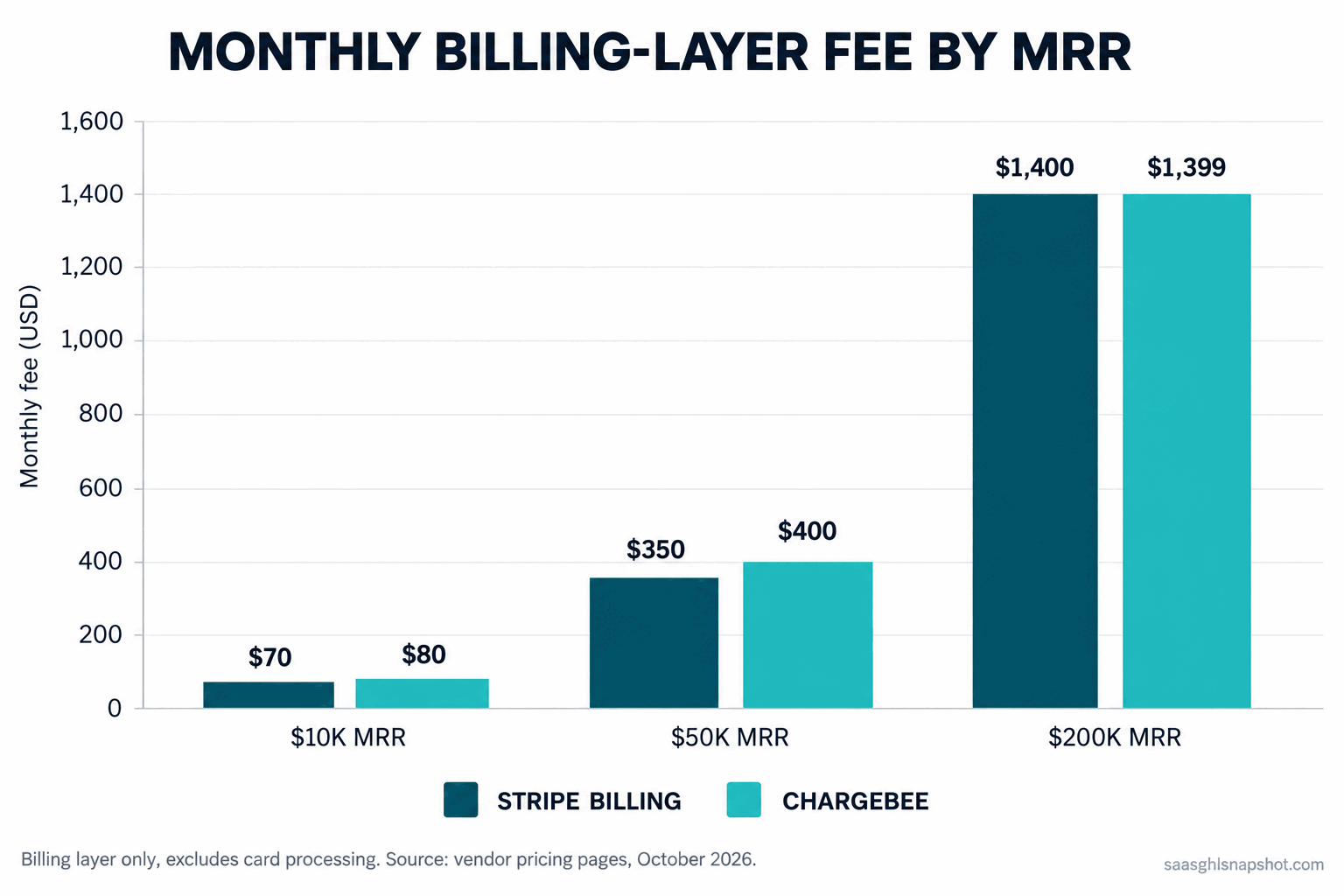
Billing-layer fee only, at three MRR levels, on each vendor’s published 2026 rates. Processing fees are left out because they are roughly equal on both sides and would only hide the difference.
Monthly billing-layer fee in US dollars, by MRR. Stripe Billing at 0.7% pay as you go; Chargebee at 0.80% below the $66K breakeven and $99 plus 0.65% above it. Source: Stripe Billing pricing and Chargebee pricing, October 2026.
At $10K MRR (pre-revenue to early): Stripe is $70 a month, Chargebee $80. A $10 gap is noise; pick Stripe if you are already on it.
At $50K MRR (the band most of this site’s readers live in): Stripe is $350 a month, Chargebee $400, a $600-a-year gap. If that $600 buys a dunning engine that saves even one $500-a-month account before it churns, Chargebee pays for its premium in the first month. If you never touch the extra controls, you are paying for flexibility you are not using.
At $200K MRR (scaling): Stripe is $1,400 a month, Chargebee $1,399. They converge almost exactly, because Chargebee’s 0.65% above breakeven plus the $99 base lands within a dollar of Stripe’s flat 0.7%. The fee is identical and the choice is entirely about features and processor strategy. Price the pay-monthly tiers and an enterprise quote here, because committed volume moves the rate.
Across all three levels, price is a rounding error next to processing fees and recovered revenue. Choose on fit, then confirm the fee is acceptable.
A billing tool is not a lifecycle tool. Both retry failed cards; neither runs your trial-to-paid activation, churn health scores, or the win-back after a cancel. That gap is where most recoverable revenue hides, and it is what our failed-payment dunning playbook and silent-churn early-warning system are built to close.
Steal this: the dunning sequence that recovers failed payments
The highest-ROI thing either tool does is retry failed cards and nudge the customer. Both do the retries. Few teams write the messages well, and the messages are what move recovery from “about half” toward the 70% to 85% best-in-class dunning hits. Here is a sequence you can paste in, whatever runs it. Keep the tone calm, because most failures are honest accidents, not people trying to leave.
Email 1, the day the card fails:
Subject: A quick heads-up about your [Product] payment
Hi [First name], your latest payment for [Product] did not go through, usually an expired card or a bank flag. We will retry automatically in a couple of days, so it may sort itself out. To fix it now, update your card here: [link]. Your account is still active.
SMS, day 2 if the retry has not cleared (only if they opted in to texts):
Hi [First name], the retry on your [Product] payment did not clear yet. Update your card in 30 seconds so you keep access: [link]. Reply STOP to opt out.
Email 2, day 4:
Subject: Second try did not go through either
Hi [First name], we tried your card again and it still was not accepted, almost always an expired card or a daily limit. Fix it here: [link]. We will try once more on [date]; after that your access pauses, and I would hate for that to interrupt your team.
Email 3, day 7, the last retry:
Subject: Last chance before your [Product] account pauses
Hi [First name], this is the final automatic retry. If it does not clear today, your account pauses tonight and your data stays safe for 30 days. Updating your card takes under a minute and turns everything back on: [link]. If something changed and you need a different plan, just reply and I will sort it out.
Four touches, calm language, a real link every time, and a human reply at the end. That reply matters because a failed payment is sometimes a downgrade in disguise, and catching it as a conversation saves accounts pure automation loses. If the account has also gone quiet, that is a more urgent problem, covered in our silent-churn guide.
The compliance layer most teams skip
Billing touches three rulebooks that can quietly cost you money. Not legal advice, but a bootstrapped founder should have it on the radar.
Dunning emails, CAN-SPAM, and SMS. A failed-payment notice is a transactional email, with more leeway than marketing under CAN-SPAM, but the moment you add an upsell it starts to look commercial, so keep dunning strictly about the payment. If you text, you need A2P 10DLC registration first, or carriers filter it. The Gmail and Yahoo bulk-sender rules from February 2024 apply over 5,000 messages a day: SPF, DKIM, DMARC, a spam rate under 0.30%, and one-click unsubscribe. Dunning volume counts toward that threshold.
EU payments and SCA. If you bill in Europe, Strong Customer Authentication requires many card payments to pass a 3D Secure challenge. Both tools handle the flow, but misconfigured SCA shows up as a spike in failed payments that looks like churn and is actually a setup problem. If your EU decline rate is high, check SCA before you blame the cards.
Card data, PCI, and GDPR. Customers’ card numbers are held by the processor under PCI-DSS, which is what makes switching processors a real project rather than a CSV export. GDPR applies the moment an EU customer’s data lands in your billing system, so make sure your vendor is a data processor you can name in your privacy policy and DPA.
Objections
“We already use Stripe. Isn’t Stripe Billing automatic?” Partly. Turning it on is not the same as configuring dunning, tax, and retries well. The default retry schedule and emails are fine, not great, and the difference between fine and great is the 15% to 30% of failed revenue you leave on the table. Spend the afternoon tuning it even on the easy path.
“Chargebee is more expensive, so why would a bootstrapped team pay more?” Because the price gap is tiny and the feature gap is not. At $50K MRR the difference is $600 a year. If you genuinely need gateway choice or tunable dunning, that $600 is cheap; if you do not, run Stripe Billing and do not pay a premium for flexibility you will never use.
“Can’t I just use Stripe Checkout and skip the billing layer?” At very low volume, basic subscriptions on Stripe’s core product are reasonable. But the moment you want smart retries, proration, tax, and real subscription reporting, you are rebuilding the billing layer yourself in code, which is a worse use of founder time than paying 0.7%. Build it yourself only if billing is your actual product.
Back to the account that emailed three weeks late. With either tool configured well, that email never gets sent. The tool matters less than whether you set up the recovery: Stripe Billing if you want it simple, Chargebee if you need the flexibility. Spend your energy on the dunning sequence and deliverability, because that is where the recovered revenue lives. For the sales side of the stack, our best CRM for founder-led sales comparison runs the same honest-math treatment.
Frequently asked questions
Is Stripe Billing cheaper than Chargebee?
Slightly, at low volume. Stripe Billing charges 0.7% of recurring volume and Chargebee's entry plan charges 0.80% below its $66K monthly breakeven. At $50K MRR that is about $350 versus $400 a month. Above $66K in monthly volume Chargebee flips to $99 plus 0.65%, which can match or beat Stripe, so by $200K MRR the two are within a dollar of each other. Both sit on top of the same 2.9% plus 30 cent card-processing fee.
Does Chargebee replace Stripe?
No. Chargebee is the subscription layer, not a payment processor. It plugs into a gateway you choose, which can be Stripe, Braintree, Adyen, and others, and still relies on that gateway to move the money. Stripe Billing, by contrast, only works with Stripe as the processor. If you want to keep Stripe for payments but have a more flexible subscription layer, Chargebee on Stripe is a valid setup.
How much failed-payment revenue can good dunning recover?
Stripe's published benchmark is that its recovery tools get back roughly 55% of failed recurring payments, with Smart Retries adding about 9% over a fixed schedule. Best-in-class dunning, with well-written emails and tuned retry timing, reaches 70% to 85%. The retries are only half the job; the message copy and email deliverability decide where in that range you land.
Do I need revenue recognition at $50K MRR?
Usually not yet. ASC 606 revenue recognition matters once you raise money or sell to finance-led buyers who ask for it. Both Stripe and Chargebee sell it as a paid add-on, and Chargebee's is deeper for messy or multi-entity books. If nobody has asked for a rev-rec report, add it when the need is real.
What's the hidden cost in switching billing providers later?
The card data. Your customers' card numbers are held by the processor under PCI rules, so moving providers means a compliant card-data migration the vendor you are leaving has no reason to make quick. That, plus re-syncing every active subscription, is why switching is a project, not a settings change. Before you sign with either, get the full export terms for customers, subscriptions, and payment methods in writing.
Related reading: the real cost of your GTM stack in 2026, a failed-payment dunning playbook that recovers revenue, and how to catch customers before they cancel.