

For a 5-person B2B SaaS running founder-led sales, Attio and HubSpot Sales Hub do the same job, but the first-year bill is not close. Attio Pro runs $79 per seat a month on the annual plan, so five seats cost about $4,740 for the year with no setup fee. HubSpot Sales Hub Professional runs $90 per seat plus a mandatory $1,500 one-time onboarding fee that never shows on the slider, so the same five seats cost about $6,900 in year one. Attio is cheaper, faster to stand up, and has a cleaner data model. HubSpot is worth it only if you need its full marketing-and-service ecosystem and can live with an annual contract you cannot shrink mid-term. Here is the per-seat math, the eight things that differ, and what a migration costs.
It is a Tuesday and you are five people. Your pipeline lives in a spreadsheet nobody trusts, and you know you need a real CRM. You open HubSpot because everyone says HubSpot, you see “$7 a seat,” you start the trial, and six weeks later a rep quotes a five-figure first-year number with a required onboarding fee attached. That gap between the slider and the invoice is the whole reason this comparison exists.
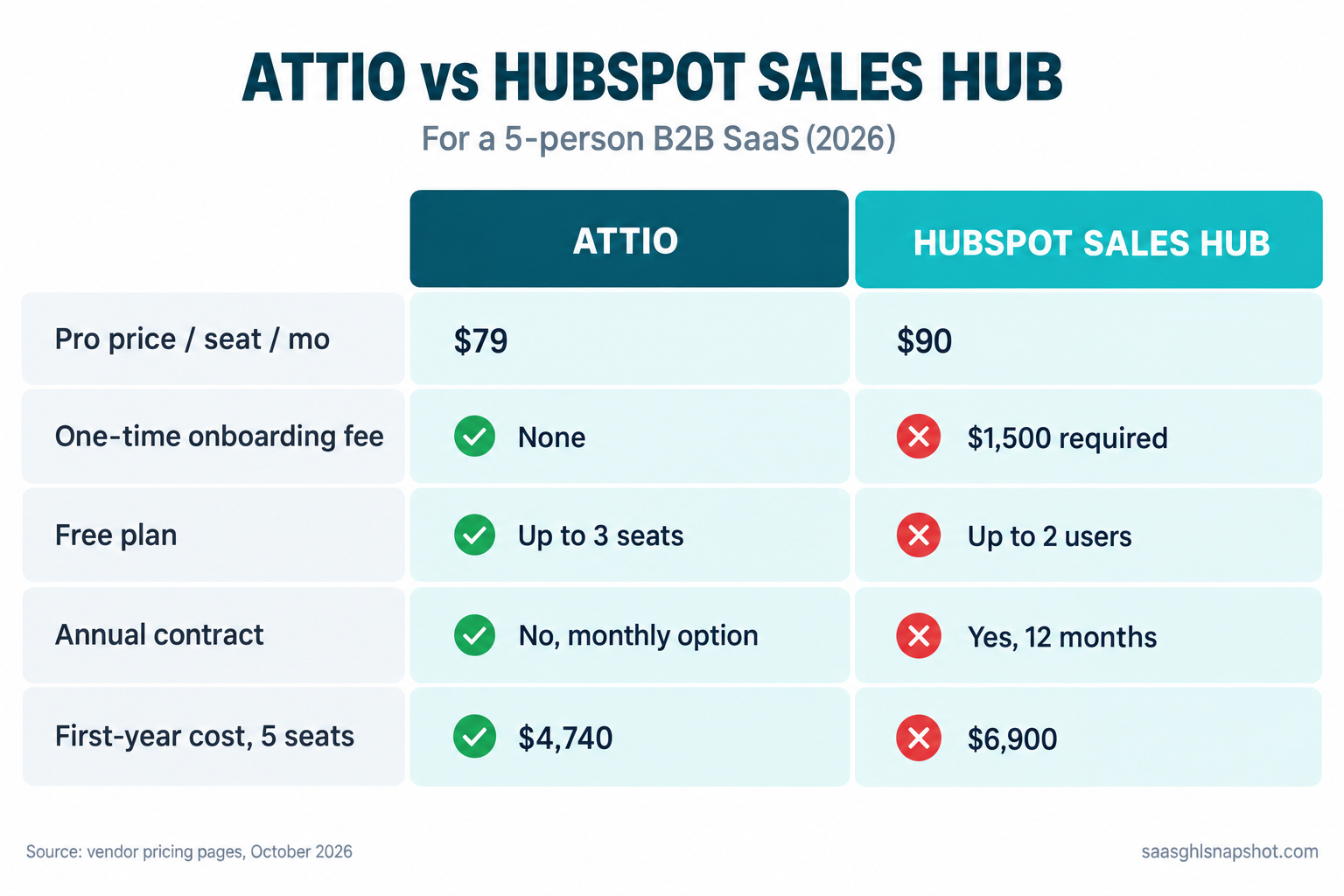
Table of contents
- Why the sticker price is the smallest number that matters
- The pricing, side by side
- The eight things that actually differ
- What it really costs at 3, 5 and 10 seats
- Steal this: the 7-step HubSpot-to-Attio migration runbook
- The compliance layer both tools leave to you
- Objections
- Who should pick which
- FAQ
Why the sticker price is the smallest number that matters
A CRM is one of the few tools you buy once and cannot easily leave. Your deal history, custom fields, automations and your team’s muscle memory all end up inside it. So the number that matters is not the monthly per-seat price. It is the total first-year cost, plus the cost of getting your data out again if you pick wrong. That matters more now that growth is tighter: median growth for private B2B SaaS was about 22% in 2026, down from 25% in 2024, with 7.3% of companies reporting flat or negative growth (SaaS Capital).
These two tools are also not the same shape. Attio is a CRM. HubSpot Sales Hub is the sales slice of a much larger suite that also sells marketing, service and a CMS. If you want a CRM that runs founder-led sales without the rest, the HubSpot suite is surface area you pay for and will not use.
The pricing, side by side
Real numbers from each vendor’s pricing page, pulled October 2026 from a US endpoint in US dollars. Both localize and reprice, so confirm on the live page before you commit.
| Attio | HubSpot Sales Hub | |
|---|---|---|
| Free plan | Yes, up to 3 seats | Free tools, up to 2 users |
| Entry paid tier | Plus, $44/seat monthly or $35 annual (up to 10 seats) | Starter, about $20/seat (a $7 intro promo reverts) |
| The “real CRM” tier | Pro, $99/seat monthly or $79 annual | Professional, $90/seat annual |
| One-time onboarding fee | None | $1,500 required on Professional |
| Enterprise | Custom, annual only | $150/seat plus $3,500 required onboarding |
| Annual contract | No, monthly available | Yes on annual plans, hard to shrink mid-term |
| Best for | A lean team that wants a flexible CRM, fast | A team that wants the full HubSpot suite |
Two lines decide most of it. Attio is free up to 3 seats, so a solo founder or a three-person team runs a real CRM for $0, while HubSpot’s free tools cap at 2 users (Attio pricing, HubSpot Sales Hub pricing). And HubSpot Professional carries a one-time onboarding fee of $1,500 that its own page calls “required,” with a $3,500 version on Enterprise. Attio charges nothing to get started.
The eight things that actually differ
1. What each one really costs per seat
On the plans most small teams run, Attio Pro is $79 a seat a month on the annual plan and HubSpot Sales Hub Professional is $90. That $11 looks small until you multiply it by a team and a year: at five seats it is $660 a year before HubSpot’s setup fee. Attio also bills monthly with no annual lock; HubSpot’s cheapest pricing ties you to an annual plan.
2. The onboarding fee and the contract you cannot shrink
This is the single biggest hidden cost here, and it is not hidden, it is published. HubSpot Professional requires a one-time onboarding fee of $1,500, and Enterprise $3,500 (HubSpot Sales Hub pricing). The annual contract is also hard to shrink mid-term: operators report being unable to drop seats or downgrade before renewal (HubSpot complaint records, Better Business Bureau). Attio has no setup fee and bills month-to-month, so if it is wrong you leave in thirty days, not twelve months.
3. The free tier and how far it carries you
Attio’s free plan supports up to 3 seats with real CRM features: pipeline, contacts, company records, email sync and a handful of reports. For a pre-revenue or very early team, that is a working CRM at zero cost. HubSpot’s free tools cap at 2 users and gate the automation that makes a sales CRM useful. If you are three people and broke, Attio free is a genuine option and HubSpot free is a demo.
4. The data model and whether you outgrow it
Attio is built around a flexible data model: you shape objects, fields and relationships to match how your business actually works, closer to a spreadsheet-database hybrid than a fixed CRM. For a SaaS with an unusual sales object (a workspace, a seat, a usage tier) you do not fight the tool. HubSpot’s model is fixed around contacts, companies, deals and tickets, good for standard B2B sales but requiring paid custom objects to bend. If your data is weird, Attio bends and HubSpot resists.
5. Automation and sequences
Both tools automate. HubSpot’s sequences and workflows are deep, with more range for heavy multi-step nurture at the top end. Attio’s automations cover the founder-led essentials: route a new lead, trigger a follow-up, update a stage, sync an email. For a five-person team you will use maybe 20% of either tool, and both cover that 20% well. The gap only shows when you scale into complex lifecycle marketing.
6. Reporting and forecasting
HubSpot’s reporting is strong and its forecasting is built for a sales manager watching a team. Attio’s reporting is clean, with report counts that scale by tier (up to 100 on Pro). For founder-led sales where the forecast is you knowing your ten live deals by heart, Attio is plenty. Hire a VP of Sales who wants weighted-pipeline dashboards and HubSpot’s depth starts to earn its price. Buy for where you are now.
7. Migration cost and data portability
This is the cost nobody prices. Attio is built for self-serve import, part of why it charges no onboarding fee; HubSpot attaches a paid onboarding engagement to Professional, which tells you how heavy the setup is. Getting out is harder: both export core records, but deal history, activity timelines and custom-object relationships break on the way out. Keep your source of truth exportable and your custom objects documented. Our migrate off HubSpot without losing deal history guide walks the exact export mapping.
8. The ecosystem question
HubSpot’s real pitch is not the CRM, it is the suite: marketing campaigns, support tickets and a CMS all wired to the same contact record under one login. Attio is a CRM that integrates outward to the tools you already run. For a lean team that kept a small stack on purpose, the suite is surface area you pay for and do not use. For a team planning to run everything from one vendor, it is the point.
What it really costs at 3, 5 and 10 seats
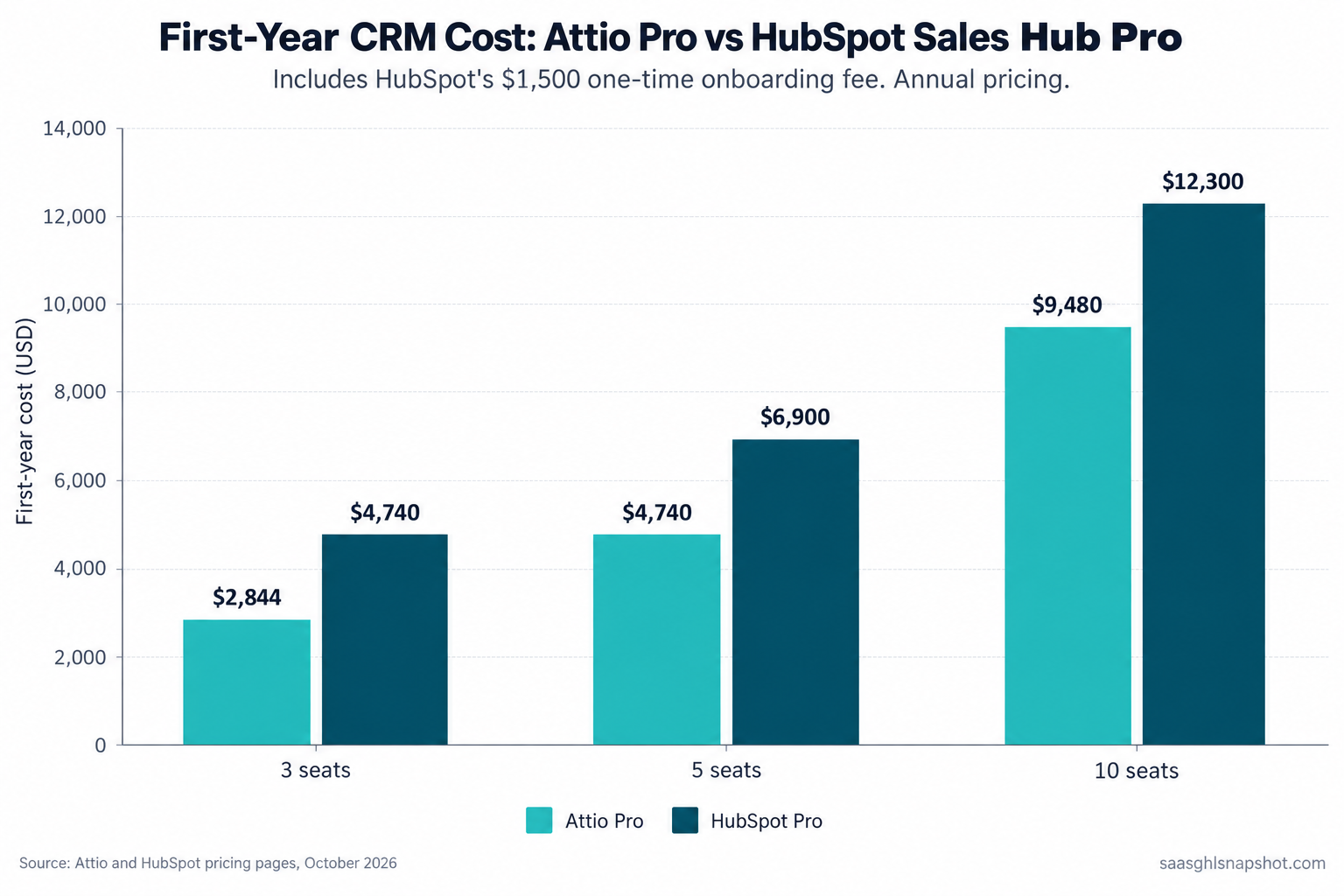
First-year cost for the “real CRM” tier on each side, Attio Pro against HubSpot Sales Hub Professional, including HubSpot’s $1,500 onboarding fee, annual pricing on both.
First-year cost in US dollars, annual plans. Attio Pro at $79 per seat, no setup fee; HubSpot Professional at $90 per seat plus the $1,500 onboarding fee. Source: Attio pricing and HubSpot Sales Hub pricing, October 2026.
Run the framework for three team sizes; the answer genuinely changes.
The solo founder or a 3-person team (pre-revenue to early). Attio is free up to 3 seats, so you run a real CRM for $0, or $2,844 a year if you need Pro. HubSpot’s free tools cap at 2 users, so your realistic HubSpot path is Professional at $4,740 in year one. The choice is almost not a choice: Attio free, upgrade when you have revenue.
The 5-person team (most readers here). Attio Pro is $4,740 for the year. HubSpot Professional is $6,900 in year one, then $5,400 after. That $2,160 gap is almost exactly HubSpot’s onboarding fee plus the per-seat premium. Attio Pro at five seats costs the same $4,740 as HubSpot Pro at three: you buy two extra seats for the price of HubSpot’s setup fee. And if you do not need Pro’s reporting, Attio Plus at five seats is $2,100 a year, under a third of the HubSpot number.
The 10-person team (scaling). Attio Pro is $9,480 for the year, HubSpot Professional $12,300. The gap widens to $2,820 because the per-seat premium compounds while the onboarding fee stays fixed. This is the size where HubSpot’s reporting and ecosystem start to earn their keep, so the question stops being price and becomes whether you want the whole suite.
The number that should actually drive your decision, though, is not either CRM bill. It is how much revenue your pipeline leaks between a trial signup and a renewal, which is usually ten times either subscription.
Steal this: the 7-step HubSpot-to-Attio migration runbook
Most of the fear around switching CRMs is fear of losing data, so here is the exact sequence to move from HubSpot to Attio without losing deal history. Do it over a weekend, keep a rollback until you are sure.
Step 1. Freeze and export everything. Export contacts, companies, deals, activities and notes from the old system, each as its own CSV. Keep these files: they are your rollback if the move goes wrong.
Step 2. Map your objects on paper first. Write down how each object translates (a HubSpot deal becomes an Attio deal, every custom field gets a named home) before you import a single row. Most botched migrations are botched here, not in the tool.
Step 3. Clean before you import, not after. Dedupe contacts, fix junk, and delete the test records and dead leads you will never touch. You pay per seat to store this data, so do not carry rot across.
Step 4. Import companies first, then contacts, then deals. Load the parent records first so contacts and deals resolve their relationships instead of creating orphans. Pick one key field to match on (usually company domain) and keep it consistent.
Step 5. Re-attach the history. This is the step teams skip and regret. Deal notes and timelines are what make a CRM worth trusting. Import notes as records linked to the right deal, and if the timeline cannot come across cleanly, attach a dated export to each deal so the context is one click away.
Step 6. Rebuild only the automations you use. Do not recreate forty workflows. List the five or six your team runs daily (new-lead routing, follow-up reminders, stage-change alerts) and rebuild those. Leave the rest.
Step 7. Run both for two weeks, then cut. Keep the old CRM read-only while the team lives in the new one. When nobody has needed it for two weeks, cancel, timed to the renewal date if you are leaving HubSpot, because the annual contract will not refund the remainder.
The compliance layer both tools leave to you
A CRM stores contacts; it does not make your outbound legal. These rules are yours whichever tool you pick, and they bite small teams hardest because nobody owns them.
CAN-SPAM governs every lifecycle and sales email you send in the US: a real physical address in the footer, a working unsubscribe, honest subject lines, no emailing people who opted out (FTC CAN-SPAM guide).
Google and Yahoo bulk sender rules have been in force since February 2024. Send 5,000 or more messages a day and you need SPF, DKIM and DMARC, a spam-complaint rate under 0.30%, and one-click unsubscribe via the List-Unsubscribe-Post header (Google guidelines). Below that volume the same setup still protects your deliverability.
GDPR applies the moment an EU trial signup lands in your CRM, which for most SaaS is week one: a lawful basis to process, a way to honor deletion requests, a record of consent. CCPA and CPRA extend similar rights to California residents, and SOC 2, while not a law, is a sales blocker your CRM choice feeds into. Neither tool makes you compliant by default. We cover the full setup in our email deliverability and compliance guide.
Objections
“We are already in HubSpot. Isn’t switching more expensive than staying?” Sometimes. If you are deep in HubSpot’s marketing and service tools, switching the CRM alone is disruptive. But if you only use the Sales Hub slice, you are paying suite prices for a pipeline tool, and the switch pays back inside a year. List the HubSpot features your team touched this month. If it is just contacts, deals and a few sequences, you are overpaying.
“Attio is newer. Is it safe to bet on?” It is a funded, widely adopted CRM, not a weekend project. The real risk mitigation is not vendor age, it is data portability: keep your export current and your objects documented, and you can leave any CRM in a weekend. Bet on tools you can walk away from.
“Do I need to be technical to run Attio?” No. The flexible data model means you can customize it, not that you have to. Out of the box it is a working CRM a non-technical founder can run before lunch, with the flexibility there for the day your model gets weird.
“What about the $7 HubSpot price?” It is a promo that reverts, and Starter lacks the automation, sequences and reporting most teams need. Compare the tiers you will actually run: Attio Pro at $79 against HubSpot Professional at $90 plus $1,500. The honest entry-level fight is Attio free against HubSpot free, and Attio wins outright.
Who should pick which
Pick Attio if you are a lean B2B SaaS that wants a flexible, fast-to-stand-up CRM without a setup fee or an annual lock, if your data model is non-standard, or if you are three people who want a real CRM for free. That is most readers of this site.
Pick HubSpot Sales Hub if you want the full suite (marketing, service, CMS) under one roof, need a sales manager’s deep forecasting, or are already so embedded in HubSpot that the CRM is the least of what you use. Just go in knowing the real first-year number includes $1,500 and the contract is a year.
Either way, the CRM is the cheapest decision in your stack and the least of your revenue leak. For a fuller picture, see our best CRM for founder-led sales comparison and the HubSpot Sales Hub pricing teardown. The money is not in the CRM line item. It is in closing the gaps between signup, activation and renewal, which is what our failed-payment dunning and churn instrumentation playbooks are built to do.
Is Attio cheaper than HubSpot for a small B2B SaaS?
Yes, at every team size on the comparable tier. Attio Pro is $79 per seat per month on the annual plan with no setup fee, while HubSpot Sales Hub Professional is $90 per seat plus a required $1,500 one-time onboarding fee. For a 5-person team that is about $4,740 versus $6,900 in year one, and Attio is free up to 3 seats where HubSpot's free tools cap at 2 users.
What is HubSpot's $1,500 fee and is it really required?
It is a one-time onboarding fee attached to Sales Hub Professional, and HubSpot's own pricing page describes it as required. Enterprise carries a $3,500 version. It is a real first-year cost that never appears on the per-seat slider, so budget for it before you compare monthly prices.
Can I move my deal history from HubSpot to Attio without losing it?
Mostly, with care. Core records (contacts, companies, deals) export and import cleanly; activity timelines and custom-object relationships are the parts that break. Export everything first, import companies then contacts then deals so relationships resolve, re-attach notes as linked records, and run both systems for two weeks before you cut over.
Is Attio's free plan a real CRM or just a trial?
It is a permanent free plan for up to 3 seats, with pipeline, contacts, company records, email sync and a few reports. For a pre-revenue or very early team it is a working CRM at zero cost, not a time-limited trial. You upgrade to Plus or Pro when you need more seats, reports or automation.
Which should I pick if I want marketing and support in the same tool?
HubSpot. Its pitch is the suite: marketing, service and a CMS wired to the same contact record, built for running everything under one vendor. If you want a focused CRM and keep marketing and support in separate tools you already like, Attio is the cheaper, more flexible fit.