
Customer.io’s pricing page says “starts at $100 a month.” That is the least useful figure on the page, because Customer.io does not bill you for the emails you send or the customers you keep. It bills you per profile, and a profile is anyone you have ever tracked: the trial that churned in March, the lead who unsubscribed in April, the 2,000 contacts an integration deleted and quietly re-added last week. You can have a 4,000-person active list and pay for a 10,000-person bracket, because your billable profile count is a different, larger number than the one you think you manage. This teardown walks the real 2026 math and the five ways it runs away from you.
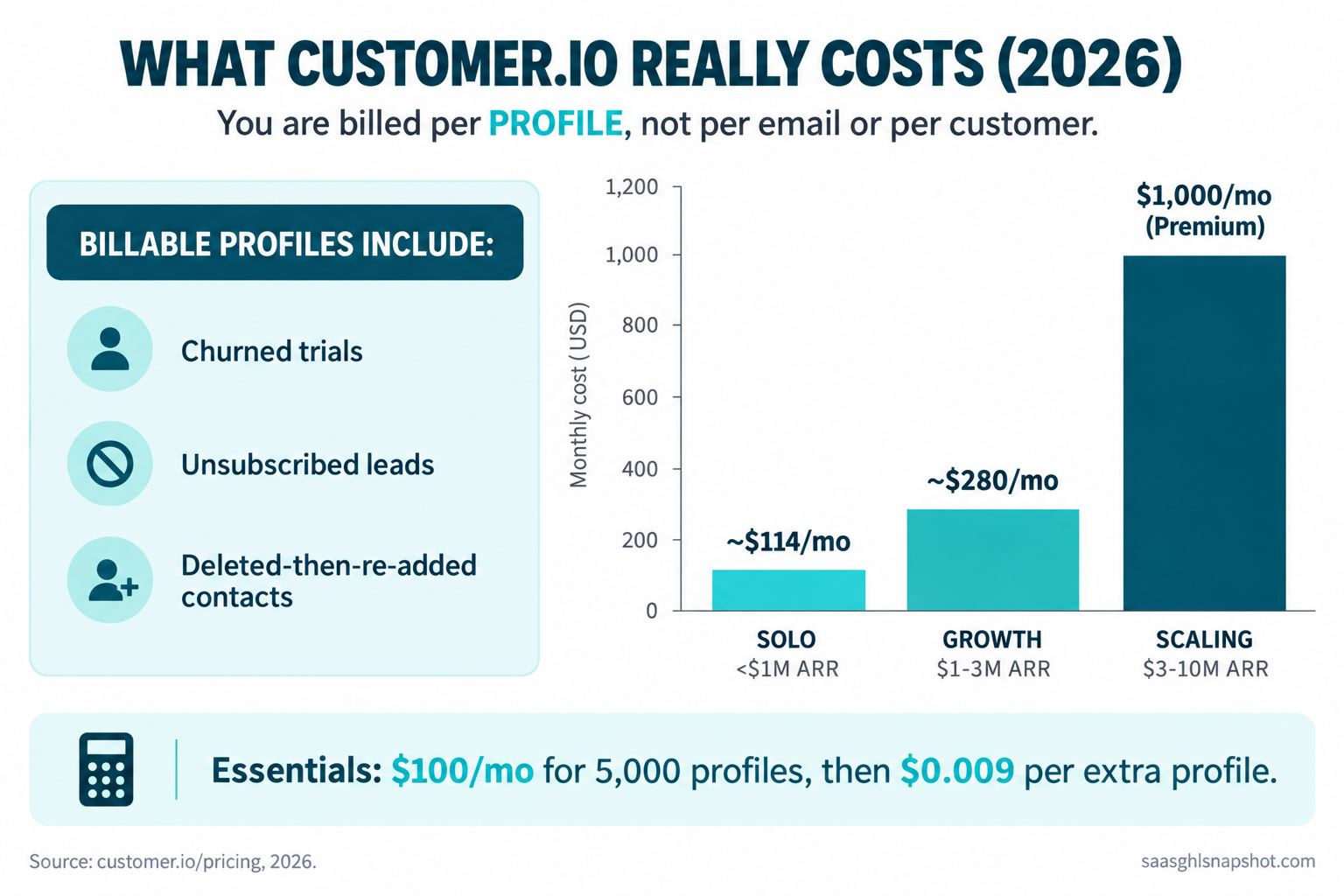
Table of contents
- The short answer
- How Customer.io billing actually works
- The real monthly cost at three ARR bands
- The five ways the profile bill runs away from you
- The $100-to-$1,000 Premium cliff
- Customer.io vs the cheaper lifecycle options
- Steal this: the profile-hygiene checklist
- The flat-rate alternative
- Objections
- One compliance trap
- FAQ
- Sources
The short answer: $100 is not your bill
Customer.io’s Essentials plan starts at $100 a month and includes 5,000 profiles and 1 million emails, then charges $0.009 for every profile above 5,000 and $0.12 for every additional 1,000 emails (Customer.io pricing). Premium starts at $1,000 a month, billed yearly, with custom volume. That is the whole published price list.
The trap is not that the price is hidden, it is what the price is attached to. You pay for profiles, and the number you are billed for includes people who left, people who unsubscribed, and people a sync deleted and re-added inside the same cycle. The real question is not “what does Customer.io cost per contact,” it is “how many profiles will it decide I had this month,” which runs bigger and less predictable than the list you actually market to.
For a bootstrapped team this is not a rounding error. Median growth for private B2B SaaS ran about 22% in 2026, down from 25% in 2024, with only 7.3% of companies reporting flat or negative growth (SaaS Capital, 2026 Benchmarks). Growth means signups, signups mean profiles, and profiles are the meter, so a tool priced this way turns every good month into a bigger invoice, whether or not those profiles ever paid you a cent.
How Customer.io billing actually works in 2026
Two meters run at once, and the quote only shows you the floor.
1. Profiles. A profile is any person record in your workspace. Essentials includes 5,000 and bills $0.009 for each one beyond that, in stepped brackets: 5,000 is $100, 10,000 is $145, 20,000 is $235, 30,000 is $325, 40,000 is $415, and 50,000-plus starts at $505 (Customer.io pricing). The problem is which profiles land on that ladder.
2. The two profile counts. Your account summary shows two numbers. Current profiles are the records in your account right now. Billable profiles are every profile added since the billing period started, including any you deleted during it, and you are charged on the bigger one (how we bill).
3. Messages. Essentials bundles 1 million emails, then $0.12 per additional 1,000, and billable messages include mail that bounces, gets suppressed, or gets flagged as spam, because the meter counts anything handed to the ESP (how we bill). For most early-stage SaaS the profile meter bites first.
There is no permanent free plan, only a 14-day trial and a Startup Program that gives a full year free to companies that have raised under $10M (Customer.io pricing). That program is the single best lever an early-stage team has here.
The real monthly cost at three ARR bands
Every figure below is an illustrative estimate from list prices and a stated profile assumption, not a quote. The point is the gap between the list you manage and the profiles you pay for, so each band shows both numbers.
| Band | Active profiles | Billable profiles (churn + re-adds) | Plan | Modeled monthly cost |
|---|---|---|---|---|
| Solo / under $1M ARR | 4,000 | ~6,500 | Essentials | ~$114 |
| Growth / $1–3M ARR | 18,000 | ~25,000 | Essentials | ~$280 |
| Scaling / $3–10M ARR | 60,000 | ~80,000 + managed deliverability | Premium | $1,000+ |
Modeled monthly Customer.io cost by ARR band. Illustrative estimates from Customer.io list pricing, November 2026. Billable profiles assume ordinary churn plus one noisy sync.
Walk the solo band. You market to 4,000 people, but a month of trials, churn, and a re-adding sync pushes your billable count near 6,500, off the $100 floor to roughly $114. The mechanism is the point: you pay for 6,500 while managing 4,000, and the gap only widens.
The growth band stings. An 18,000-person active list with normal churn and a couple of integrations can bill at 25,000-plus profiles, near $280 a month, about $3,360 a year, to email a list two-thirds that size. The scaling band hits a wall covered next: once you need managed deliverability, you are off Essentials and onto Premium at $1,000 a month billed yearly.
The five ways the profile bill runs away from you
This is the part no pricing page writes, and it is where the money leaks. For each, the trigger and the fix.
1. Unsubscribed people keep billing. When someone unsubscribes, Customer.io keeps and flags the profile so you can honor the opt-out (email suppression). Correct behavior, real cost: a contact you can never email again still sits on your meter, and over a couple of years a growing list carries thousands of unmailable profiles at $0.009 each. The fix: set a retention window and delete dead unsubscribed profiles deliberately, after exporting them for your suppression record.
2. The delete-then-re-add double count. This is the big one. Billable profiles count everything added in the period, deleted or not, and a re-add inside the same cycle counts again (how we bill). A reverse-ETL job or nightly CRM sync that recreates records it just cleaned can balloon your count with zero new humans. The fix: audit every inbound sync and make deletes happen once, upstream, not on a loop.
3. Suppress versus delete gets reversed. Deleting a profile is undone the moment any source sends the same identifier again, so a “cleaned” profile walks back in and bills again. Suppressing blocks the re-add (delete people). The fix: suppress identifiers you want gone for good; delete only when you control every source that could re-add them.
4. Bounced and suppressed sends still count. The message meter counts anything handed to the ESP, including mail that bounces, gets suppressed, or gets flagged as spam (how we bill), so a dirty list bills you for sending into the void. The fix: validate and sunset dead addresses before a broadcast, not after.
5. The success tax on growth. Every metric that says you are winning, more signups, trials, and tracked leads, is a line on the profile meter. Median monthly SaaS churn sits around 3 to 4%, top quartile 1 to 2% (ChartMogul SaaS Benchmarks, 2023 edition), and every churned account stays billable until you remove it. The fix: make profile hygiene a monthly ritual, not an annual cleanup.
The $100-to-$1,000 Premium cliff
Essentials to Premium is not a step, it is a cliff: $100 a month to $1,000 a month, a 10x jump. Premium adds managed deliverability (absent from Essentials), data warehouse destinations and replay, unlimited workspaces against the 2 on Essentials, HIPAA as a paid add-on, and premium support with a success manager and migration help that cost extra on top (Customer.io pricing). SSO and two-factor are on both plans.
Here is why the cliff is a trap and not just a price. Managed deliverability is the one item a growing sender genuinely needs, because inbox placement is a revenue input, not an IT detail. So the moment your volume and reputation matter, the tool tells you the answer is a 10x invoice. You get pushed off the Essentials ledge by the one capability you cannot run a real sending program without.
Customer.io vs the cheaper lifecycle options
Customer.io is a genuinely strong tool: event-driven, flexible, built for product-led messaging. The question is whether its billing model is right for a list mostly in flux. Here is how the common alternatives bill, because the billing model is the real difference, not the feature checklist.
| Tool | Billed by | Entry point | Counts dead/unsubbed contacts? | Best for |
|---|---|---|---|---|
| Customer.io | Profiles (incl. deleted-in-period) | $100/mo, 5k profiles (pricing) | Yes, until deleted | Event-driven PLG with clean data pipes |
| Klaviyo | Active profiles | Free to 250 contacts, then tiered (pricing) | Yes, active profiles billed | Ecommerce lifecycle, heavy segmentation |
| Brevo | Emails sent, not contacts | Free 300 emails/day (pricing) | No, you pay for sends | Lists with lots of stored, rarely-mailed contacts |
| Loops | Contacts | Free tier, then flat contact tiers (pricing) | Yes, contact-based | Simple SaaS lifecycle, fast setup |
| HubSpot Marketing | Marketing contacts | Free tier, Starter from ~$20/mo (pricing) | Non-marketing contacts are free | Teams already living in HubSpot CRM |
| GoHighLevel | Flat platform fee | One price, contacts not metered (pricing) | No per-contact meter | Operators who want cost that does not scale with the list |
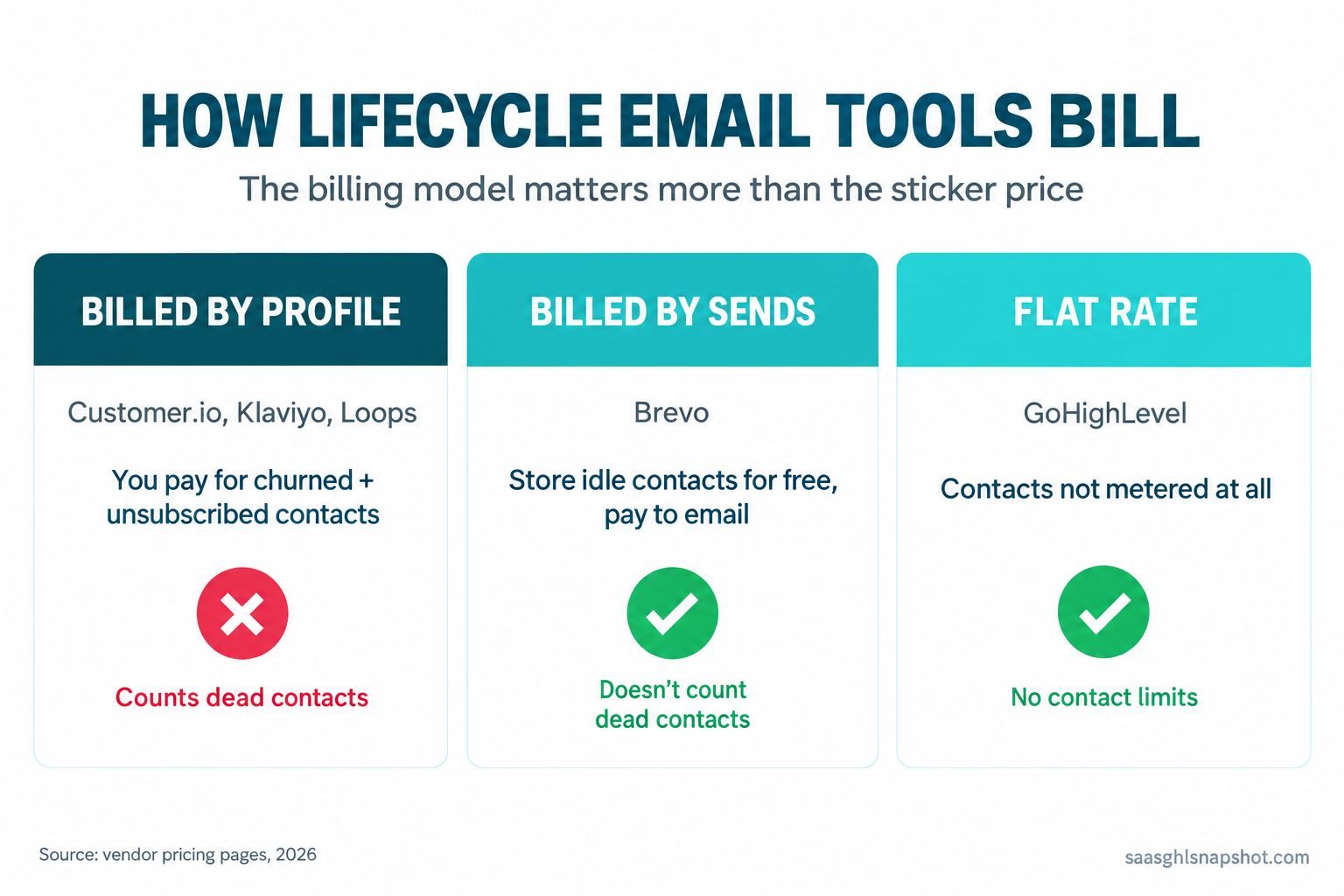
The honest read. If your list is active and you mail it hard, a profile model like Customer.io, Klaviyo, or Loops is fine, and you pay for what you use. If your list carries a long tail of stored-but-rarely-mailed contacts, which describes most B2B SaaS with any history, a send-based model like Brevo stops charging you to store dead weight, and a flat-rate platform ends the meter entirely. Profile-based billing is simply the wrong shape for a list that is mostly in motion, and most early-stage lists are.
Affiliate disclosure: the link above is a GoHighLevel affiliate link. We may earn a commission at no extra cost to you. See our affiliate disclosure.
Steal this: the profile-hygiene checklist
Customer.io’s cost is controllable if you treat profiles like inventory and run this monthly, on your billing date.
The monthly 20-minute routine:
- Compare current profiles to billable profiles in your account summary. If billable is far ahead, a sync is re-adding deleted records. Find it this month.
- Export then delete hard-unsubscribed profiles older than your retention window, keeping the export as your suppression record.
- Suppress, do not delete, identifiers you want permanently gone, so no source can re-add them.
- Turn off inbound integrations that delete and re-add records on a loop.
- Validate new-signup emails at capture so bounces never cost you.
The cost formula to run before and after cleanup:
Monthly profile cost = $100 (first 5,000 profiles)
                     + (billable profiles - 5,000) x $0.009
                     + (emails above 1,000,000 ÷ 1,000) x $0.12

True cost per active contact = total monthly bill ÷ active profiles
That last line is the one that matters: the denominator you care about is smaller than the one you are billed on.
Ask Customer.io before you commit, in writing:
- Do we qualify for the Startup Program, and what happens when the free year ends?
- Does deleting mid-cycle remove a profile from this cycle’s billable count or only the next?
- What is our real path onto Premium, and what does managed deliverability cost all-in?
The lifecycle email without Customer.io Premium breakdown and the real cost of your GTM stack worksheet apply the same discipline to the rest of your tools.
The flat-rate alternative to profile pricing
Profile pricing feels unfair because your active, mailable list is a fraction of the profiles you accumulate, yet you pay for the whole pile. Lifecycle messaging is still a retention lever worth funding: median NRR sits at 101% and median GRR at 88%, down from 90% in 2022, with CAC payback up 12.5% at the median since 2022 (Benchmarkit, 2025 B2B SaaS Benchmarks). But you do not have to buy it on a meter that grows with your list. A flat-rate GoHighLevel build runs the same event-driven email and SMS at one platform cost, so your bill stops tracking your contact count. It is not a drop-in Customer.io clone, so if you live in deep event-based personalization weigh that honestly, but for most early-stage lifecycle work the flat model is cheaper and more predictable. The SaaS lifecycle marketing playbook shows the sequences.
Objections
“But $100 a month is nothing. Why does this matter?” Because $100 is the floor, not the bill, pointed at a number that only grows. The meter counts churned, unsubscribed, and re-added profiles, so your cost drifts up even in a flat month. Model the bill at the profile count you will hit next year, dead weight included, not the sticker rate.
“We already run Segment into Customer.io, so switching is painful.” Fair, but that pipe often inflates the bill through delete-then-re-add. You do not have to switch to fix it: audit the sync, stop the record churn, and your billable count drops without changing tools. If the profile model still fights your list shape, the migrating off HubSpot without losing deal history guide covers moving lifecycle data cleanly.
“Isn’t profile-based pricing just how lifecycle tools work?” No, it is one of three models. Customer.io, Klaviyo, and Loops bill by profile; Brevo bills by sends; a flat-rate platform does not meter contacts at all. If most of your contacts sit idle, paying per stored profile is the worst of the three for the same program.
“Do I need to be technical to control this?” No. It is one habit: compare current to billable profiles monthly, delete and suppress on purpose, watch your syncs. The teams that get surprised never looked at the billable number until the invoice did, the same pattern behind silent churn.
One compliance trap: the deliverability features are behind the cliff
The feature most tied to compliance, managed deliverability, is gated behind the 10x Premium jump (Customer.io pricing), so on Essentials you handle authentication and reputation yourself, right as rules get stricter. Since 1 February 2024, Google and Yahoo require any sender pushing 5,000 or more messages a day to authenticate with SPF, DKIM, and DMARC, keep the spam complaint rate under 0.30%, and support one-click unsubscribe via the List-Unsubscribe-Post header (Google email sender guidelines). CAN-SPAM governs every lifecycle email regardless of volume, which is exactly why Customer.io retains those billable unsubscribed profiles; GDPR applies the instant an EU trial lands; CCPA and CPRA cover California contacts; SMS needs A2P 10DLC first; and SOC 2, while not a law, is a sales blocker upmarket. The full setup is in the SaaS email deliverability and compliance guide for 2026.
Frequently asked questions
How much does Customer.io actually cost in 2026?
Essentials starts at $100 a month for 5,000 profiles and 1 million emails, then $0.009 per extra profile in stepped brackets (10k is $145, 20k is $235, 50k-plus starts at $505) and $0.12 per extra 1,000 emails. Premium starts at $1,000 a month billed yearly with custom volume. There is no permanent free plan, but a Startup Program gives a free year to companies that have raised under $10M.
What counts as a billable profile in Customer.io?
Every profile added since the billing period started, including ones you deleted during it. Your account shows current profiles and billable profiles, and you are charged on the billable count. If an integration deletes and re-adds the same records in one cycle, they count twice, so a noisy sync inflates your bill without adding a single person.
Do unsubscribed contacts still cost money in Customer.io?
Yes. Unsubscribing does not delete the profile; Customer.io keeps and flags it so you can honor the opt-out. A contact you can never email again still counts toward billable profiles at $0.009 each until you deliberately delete it, which on a list with history can be thousands of unmailable profiles you are paying to store.
What is the difference between Customer.io Essentials and Premium?
Price and deliverability. Essentials starts at $100 a month; Premium starts at $1,000 billed yearly, a 10x jump. Premium adds managed deliverability (absent from Essentials), data warehouse destinations and replay, unlimited workspaces versus 2, HIPAA as a paid add-on, and premium support. The feature most senders genuinely need, managed deliverability, forces the climb.
What are the cheaper alternatives to Customer.io for lifecycle email?
It depends on your list shape. Brevo bills by emails sent, so it is cheaper when you store many rarely-mailed contacts. Loops offers flat contact tiers for simple SaaS lifecycle. HubSpot Marketing makes non-marketing contacts free. A flat-rate platform like GoHighLevel does not meter contacts at all. Klaviyo, like Customer.io, bills by profile. Match the billing model to your list before comparing sticker prices.
How do I lower my Customer.io bill without switching tools?
Run profile hygiene on your billing date: compare current to billable profiles to catch syncs re-adding deleted records, delete hard-unsubscribed profiles past your retention window, suppress rather than delete identifiers you want gone for good, and validate signup emails at capture. Also ask whether you qualify for the Startup Program's free year.
Sources
- Customer.io pricing (plan prices, profile brackets, Premium feature gating, Startup Program)
- Customer.io, how we bill (billable vs current profiles, delete-then-re-add, billable messages)
- Customer.io, email suppression and deleting people
- Klaviyo pricing, Brevo pricing, Loops pricing, HubSpot Marketing pricing
- SaaS Capital 2026 Private B2B SaaS Growth Rate Benchmarks
- Benchmarkit 2025 B2B SaaS Performance Benchmarks
- ChartMogul SaaS Benchmarks Report (2023 benchmark data)
- Google email sender guidelines (bulk-sender rules)
About the author
Mara Castellano is a Lifecycle & Retention Strategist based in Austin, TX. She has spent a decade inside product-led SaaS teams turning trial signups into retained accounts, and rebuilding the lifecycle inside GoHighLevel so founders stop overpaying for tools in the gaps between systems.
Want your lifecycle and messaging stack costed and consolidated for you? Get the SaaS Snapshot or book a walkthrough. Related: lifecycle email without Customer.io Premium, what Intercom’s Fin AI really costs, and the 2026 SaaS benchmarks.