


Build your own niche SaaS business, automate the heavy lifting, and collect recurring revenue without endless service hours
If you’re working in an agency, consulting, freelancing, or coaching role and you’ve ever thought, “How do I scale beyond trading hours for dollars?”, then this is the roadmap you’ve been waiting for. Today, you can move from selling one‑off services to offering a fully‑branded software‑as‑a‑service built on GoHighLevel. And yes—it’s entirely realistic to go from idea to monthly revenue in about 90 days.
In this guide, we’ll walk you through the exact process: choosing a niche, configuring GoHighLevel, packaging your offer, pricing smartly, launching with impact, and automating what usually breaks down. You’ll get practical workflows, real‑world examples, and a plan you can follow step by step.
What you’ll walk away knowing
- Why vertical SaaS (software built for a specific niche) dramatically lowers competition and increases value
- How to pick your niche and define a clear offer your audience wants
- The exact configuration of GoHighLevel: funnels, automations, CRM, onboarding—so you’re not starting from scratch
- A concrete pricing table you can copy and adapt for your own SaaS tiers
- Launch and marketing tactics that don’t require a large budget but deliver real traction
- How to automate onboarding and retention so you reduce churn and increase lifetime client value
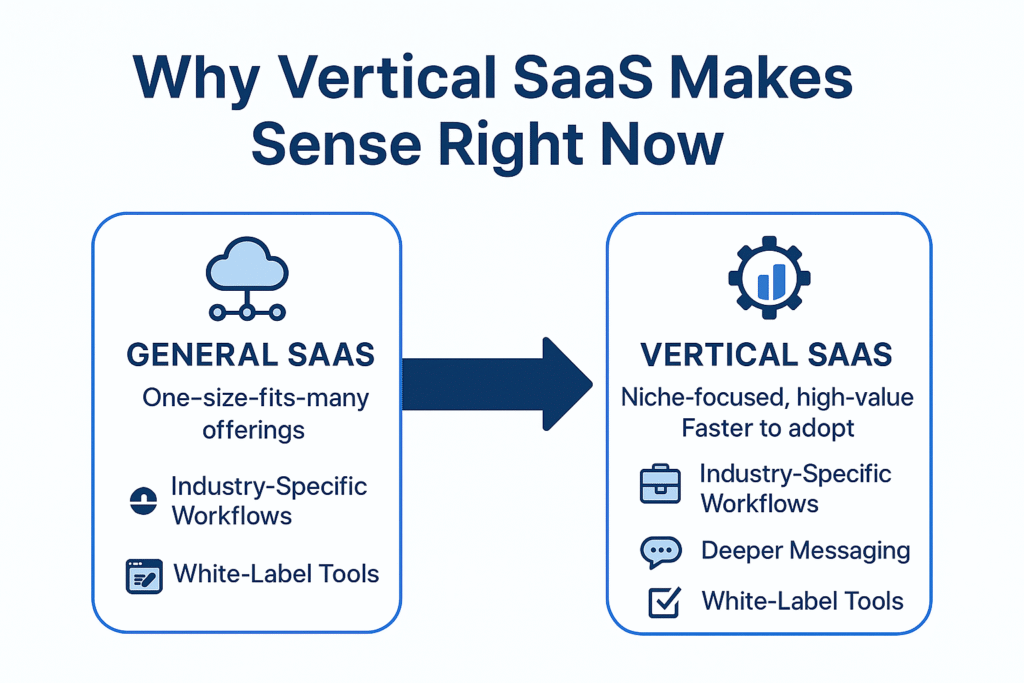
Why Vertical SaaS Makes Sense Right Now
When you build a general SaaS or an agency service, you’re competing in a sea of “one‑size‑fits‑many” offerings. But a vertical SaaS is designed for one industry, one workflow, and one pain point. That gives you an unfair advantage: deeper messaging, higher value, faster buy‑in.
According to industry research:
- Vertical SaaS refers to software made for a specific industry or niche rather than broad horizontal tools.
- That focus allows you to embed into clients’ workflows, become indispensable, and charge more.
- With platforms like GoHighLevel offering SaaS mode and white‑label capabilities, you don’t need to build everything from scratch—just brand it and deliver value.
In short: you get to build something that feels bespoke, sells faster, and scales better.
Step 1: Choose Your Niche & Define the Offer
1.1 Pick a niche you know
Focus is the key. Examples of winning verticals for GoHighLevel users:
- Real‑estate agents: lead capture → booking → commission tracking
- Med‑spas/wellness clinics: booking, reminders, reviews
- Coaches/consultants: funnels, payments, onboarding
- Home services (roofing, plumbing, HVAC): estimates, scheduling, follow‑ups
From “Top 18 Vertical SaaS Ideas,” we see markets like healthcare, education, and home services growing rapidly.
1.2 Clearly define the offer
Your SaaS solution should be more than a brand of GoHighLevel—it should feel like it was built for that niche. Map out:
The pain point: e.g., “You’re missing 40% of leads because of no timely follow‑up.”
The promise: e.g., “You’ll capture leads, automate follow‑ups, book appointments and bill—all without hiring more staff.”
The deliverables: e.g., pre‑built funnel, chatbot, calendar, SMS/email flows, onboarding dashboard.
1.3 Draft your value‑stack
Write a statement like:That statement becomes your homepage, your demo script, and your ads—it keeps your message tight.“This is the plug‑and‑play CRM + automation suite for [NICHE], so they can stop chasing leads, stop no‑shows and focus on doing what they do best.”
Step 2: Build Your GoHighLevel Foundation
Using GoHighLevel effectively means you’re not reinventing the wheel—you’re customizing it.
2.1 The configuration checklist
| Component | Action | Why it matters |
|---|---|---|
| Lead funnel/landing pages | Build ad → landing → form → thank you sequence | Captures leads and feeds your system |
| CRM tagging & segmentation | Tag by niche, source, status | Enables targeted messaging and automations |
| Chatbots / AI receptionist | Qualifies chats or calls, books calendar | Saves time, increases conversions |
| Calendar booking + reminders | Connect Google/Outlook calendar, send SMS/email reminders | Reduces no‑shows and increases client action |
| Payment and billing workflow | Connect Stripe, set up subscription triggers | Automates revenue capture and onboarding |
| Onboarding portal | Welcome pages, training videos, checklist | Speeds up client setup, reduces support burden |
| Review & retention flows | Trigger review request, follow‑up, re‑engagement automation | Builds social proof and improves retention |
2.2 White‑labeling & branding
Customize your:
- Domain and dashboard login (yourbrand.domain)
- Logo, colour palette, email sender name
- Copy and terms reflecting the niche’s language
Branding reinforces trust and helps the client feel this is their platform, not another generic tool.
2.3 Connect the essentials
- Stripe: set up subscription products and one‑time setup fees
- SMS gateway (Twilio or equivalent) for reminders and follow‑ups
- Email/SMS templates for lead capture, onboarding, no‑shows
- Import your Snapshot (if you’re using a pre‑built package) or build the flow manually
2.4 Test everything
Simulate: new lead → chatbot qualifies → calendar booking → payment → client onboarding → first actionable result (e.g., first appointment scheduled)
Ensure no broken links, tags missing or failed triggers.
Step 3: Pricing, Packaging & Monetisation
3.1 Sample pricing tiers
Here’s a concrete pricing strategy:
| Plan | Setup Fee | Monthly Fee | Features Included |
|---|---|---|---|
| Starter | US $299 | US $197/mo | Funnel + CRM + chatbot + SMS/email automation + 1 calendar |
| Growth | US $499 | US $297/mo | All Starter + branded onboarding + 2 calendars + review generation module |
| Premium | US $999 | US $497/mo | Growth + AI receptionist (voice calls) + team seats + training portal |
3.2 Why this structure works
- The setup fee covers your work: branding, import, and basic customisation
- A monthly fee ensures recurring revenue and positions you as a software provider
- Three tiers appeal to different client budgets and commitment levels
- You can upsell add‑ons (extra calendars, custom integrations, premium support)
3.3 Additional monetization
- Affiliate/referral program (give clients a discount for referring another business)
- Usage‑based pricing (extra seats, extra calendars, extra automations)
- Seasonal upgrade offers (holiday campaigns, new niche modules)
Step 4: Launch & Acquire Clients
4.1 Pre-launch prep
- Build a high‑converting landing page with a clear niche promise
- Create a demo video showing the workflow end‑to‑end
- Craft messages, and messages, and niche Facebook/Instagram ads
- Publish educational content (blog, LinkedIn post) that addresses niche pain points and mentions your “CRM & automation suite.”
4.2 Launch tactics
- Run a paid ad campaign targeting your niche, e.g., “med‑spa owners,” “real‑estate agents,” “consultants”
- Offer a “beta launch discount” or “first 10 clients special price” to incentivise early sign‑ups
- Host a live demo or webinar: show the system working, answer questions, offer quick onboarding
- Use your website chatbot to book live discovery calls 24/7
4.3 Sales call structure
During the call:
- Identify pain points (“How many leads do you miss each month?”)
- Show the solution (“Here’s how our platform captures, qualifies and books them automatically.”)
- Reveal pricing (“Plan starts at US $197/mo, with one‑time setup US $299.”)
- Overcome objections (ease of use, support, no coding required)
- Set a clear next step (“If you’re ready we can onboard you in X days and go live by [date].”)
Step 5: Onboarding, Automation & Retention
5.1 Onboarding process
- Welcome email + access to your portal
- Training video: “How we set up your portal in 24‑48 h”
- Checklist: “Connect your calendar,” “Import your leads,” “Publish your first funnel”
- Automated reminder if they don’t complete setup within a defined timeframe
5.2 Automated workflows
Automations you’ll want live:
- New client pays → send welcome email → tag “Onboarding” → trigger checklist
- Lead books appointment → send confirmation ± reminder + auto‑SMS reminder
- Payment fails → trigger retry logic + email alert + tag “Payment issue”
- Client inactive (no usage for 30 days) → trigger re‑engagement flow + offer upgrade or support
5.3 Retention strategies
- Provide early wins: show value in the first 14 days by booking first appointments or generating leads
- Collect testimonials: trigger “Leave review” after the client achieves result
- Offer community & monthly webinars: keeps clients engaged and builds loyalty
- Monitor churn and usage: if a client’s usage drops, reach out proactively
Step 6: Scale & Optimize for Growth
6.1 Operational scaling
- Hire or outsource onboarding/support tasks to a VA
- Create affiliate or partner programs to bring in new clients
- White‑label support so clients feel it’s fully branded as your platform
- Launch new niche modules or adjacent verticals once the first is stable
6.2 Optimize for performance
Key metrics to track: Monthly Recurring Revenue (MRR), Churn Rate, Customer Acquisition Cost (CAC), Lifetime Value (LTV)
Take action:
- If churn is greater than 5% per month, investigate onboarding/usage issues
- If CAC is too high, refine your ad targeting or content marketing
- If growth slows, test price changes, new features, or add‑ons
6.3 Expand your footprint
Once you dominate one niche, expand:
- Create a “Dental” version, “Law Firm” version, or “Home Services” version
- Build deeper features for that vertical (integrations, specialized workflows)
- Offer enterprise seats or team‑based pricing
Frequently Asked Questions
Do I need to know how to code?
How fast can I realistically launch?
Will this work for multiple niches?
What happens if I don’t have any existing clients or list?
How do I avoid high churn?
Conclusion
Launching a vertical SaaS on GoHighLevel is a powerful, realistic path for agencies, freelancers and consultants who want to move from one‑off projects into recurring revenue. By selecting a niche you understand, deploying a snapshot for speed, automating the core flows, pricing smartly, launching with intent and retaining clients via value automation—you create a SaaS engine rather than a manual service.
If you’re ready to stop trading hours for dollars and scale into software monthly revenue, it’s time to pick your niche, customise your system and get started today. The model works. Now it’s your turn to execute and bring your vertical SaaS vision to life.
Don’t build your SaaS from scratch.
Get a done-for-you GoHighLevel system with prebuilt funnels, AI automations, onboarding, and branded white-label design.