

As an agency owner, you know how fast-paced the digital world is. Clients and leads are impatient. If they call and no one picks up, chances are… they’re dialing your competitor next. Ouch.
But what if every missed call was automatically answered by a smart, friendly AI that sounds human, captures info, qualifies the lead, and books an appointment—all without you lifting a finger?
That’s exactly what GoHighLevel Voice AI does inside your SaaS snapshot. It’s not just call handling—it’s lead-saving, deal-closing magic 🔮
Let’s explore how this game-changing tech works and how YOU can use it to build a stronger, more profitable SaaS.
Quick Takeaways
📞 Voice AI handles missed calls instantly, capturing leads 24/7
💼 Perfect for agencies offering white-labeled SaaS with GoHighLevel
💬 Automates conversations, appointment bookings, and follow-ups
💸 Rebill clients for Voice AI usage and add a profit margin
🛠️ Easy to configure inside your GoHighLevel SaaS snapshot
🧠 Powered by GoHighLevel’s “AI Employee” suite
💥 Helps close more deals—even when your clients are off the clock
Why Missed Calls Are Killing Your Clients’ Business
Let’s be real: most small businesses miss calls every day.
They’re in meetings. Out on jobs. Closed for lunch. And every missed call is potentially:
A lost lead
A frustrated customer
A negative review
A competitor’s win
According to industry studies, up to 85% of people won’t call back if their call goes unanswered.
That’s painful. Especially when you realize most of those calls are leads ready to buy.
How GoHighLevel Voice AI Saves the Day
Enter Voice AI, part of GoHighLevel’s AI Employee Suite. It’s like giving your clients a full-time phone agent that works 24/7, doesn’t need sleep, and always says the right thing.
Here’s what it can do:
Answer incoming calls in real time
Ask relevant, pre-trained questions
Book appointments into your calendar
Qualify leads and update your CRM
Transfer to a human if needed
Leave voicemail messages when calling back
No more voicemail black holes. No more missed opportunities. Just more closed deals.
💡 Ready to Turn Every Missed Call Into a Qualified Lead?
Let Voice AI do the heavy lifting. Start capturing and converting leads while your clients sleep—without adding a single employee.
Real-World Example
Let’s say you’re managing SaaS for a dental clinic. It’s after 6 PM. A new patient calls to book an appointment.
But the front desk is closed.
Instead of voicemail, Voice AI answers:
“Hi there! Thanks for calling SmileBright Dental. Are you looking to book an appointment or ask a question about a service?”
The caller says:
“I’d like to schedule a cleaning.”
Voice AI checks the integrated calendar, confirms availability, gathers the contact info, and books it. ✨ Boom—you’ve just recovered that lead.
Even better? This lead gets added to a nurture workflow, review request system, and pipeline stage.
What Makes GoHighLevel Voice AI Different?
There are other AI-powered phone systems available… But here’s why GoHighLevel Voice AI hits differently. 👇
1. It’s Built Into Your SaaS Snapshot
No third-party integrations. No Frankensteining. It’s already inside your GoHighLevel SaaS account.
2. Easy to Train and Customize
You can customize prompts based on your niche: real estate, dental, HVAC, coaching—you name it.
3. Full CRM Integration
All conversations, call logs, bookings, and contact info are instantly added to the CRM and workflows.
4. Part of the AI Employee Suite
Bundle it with Conversation AI, Workflow AI, Reviews AI, and Content AI for a full-service automation powerhouse.
Step-by-Step: How to Set Up Voice AI in Your Snapshot
Ready to automate call handling for your clients? Let’s walk through it:
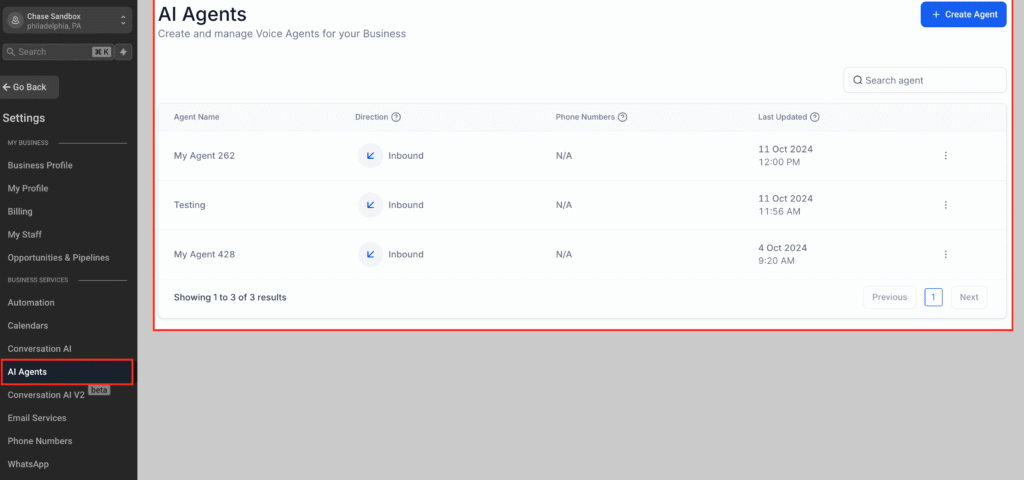
1. Enable AI Employee Tools
Go to your agency view → Settings → AI → Enable Voice AI for the sub-account.
2. Choose a Phone Number
Assign a local or toll-free number using LC Phone or Twilio integration.
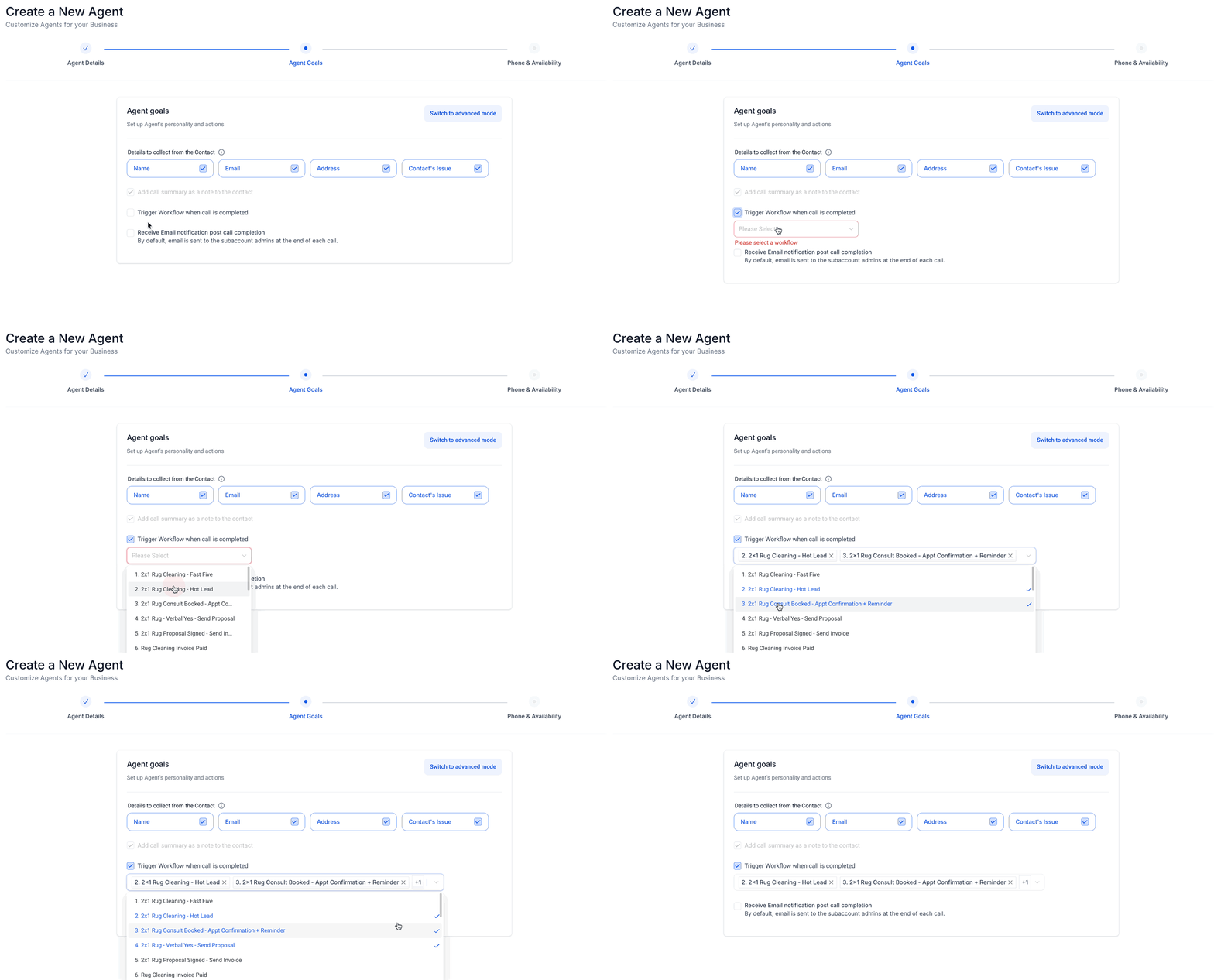
3. Configure Voice AI Flows
Set up intents like
Appointment booking
General FAQs
Sales lead capture
Add your custom questions and fallback responses to make it feel human.
4. Train the Bot
Upload FAQs or provide website links so the bot can respond correctly.
5. Integrate with Workflows
Use Workflow AI to move leads through automations:
Add tags
Update pipeline stages
Send follow-up texts or emails
6. Turn On Auto-Pilot Mode
Let the bot handle calls automatically, 24/7. Or keep it on “suggestive” mode to review answers before sending.
Pricing Breakdown
Voice AI pricing is flexible and designed to let you rebill and profit. Here’s how it works:
| Feature | Pay-Per-Use | Unlimited Plan |
|---|---|---|
| Voice AI | $0.13 per minute | Included in $97/month |
| Conversation AI | $0.02 per message | Included in $97/month |
| Reviews AI | $0.08 per review | Included in $97/month |
| Content AI | $0.09 per 100 words | Included in $97/month |
💡 You can rebill usage to clients at a markup (e.g., $0.30/min), creating a new profit stream for your agency.
How to Pitch This to Your Clients 🎤
When selling your SaaS snapshot, Voice AI becomes your wow factor.
Here’s how to pitch it:
“We’ve included smart Voice AI that answers missed calls, captures leads, books appointments, and sends follow-ups—all automatically. It’s like hiring a full-time receptionist without the overhead.”
Or…
“Our software ensures you never miss a call again. Even when you’re off the clock, your AI assistant is closing deals for you.”
Use Cases by Niche
| Industry | Voice AI Use |
|---|---|
| Home Services 🛠️ | Take after-hours service requests |
| Real Estate 🏡 | Capture inquiries and book showing appointments |
| Dental & Med 🦷 | Automate appointment scheduling and intake |
| Coaches & Consultants 🎤 | Qualify leads and book discovery calls |
| Legal 🧑⚖️ | Capture case details and pre-qualify clients |
Frequently Asked Questions
Does Voice AI sound robotic?
Not at all. It’s designed to sound conversational and can be trained to reflect your brand’s tone.
Can I customize what it says?
Yes! You can edit the prompts, responses, and questions for each client or niche.
What if a call needs human attention?
You can configure fallback actions like call transfer, voicemail, or text alert to a team member.
Is it HIPAA compliant?
While GoHighLevel offers secure systems, ensure your clients check specific compliance needs for healthcare.
Can I charge my clients for this feature?
Absolutely. You can mark up usage or bundle it into your premium SaaS plan for recurring revenue.
Conclusion
Voice AI inside your GoHighLevel SaaS snapshot isn’t just a cool add-on—it’s a lead conversion powerhouse that adds real value for your clients and serious revenue for your agency.
Whether it’s recovering after-hours calls, handling high-volume inquiries, or just sounding more professional—Voice AI helps your clients win more deals and makes you look like a rockstar. ⭐
So if you’re still letting calls go to voicemail… it’s time to let AI answer instead.
🎯 Want to Close More Deals Without Lifting a Finger?
Voice AI inside GoHighLevel is the unfair advantage your SaaS snapshot needs. It’s smart, scalable, and silently winning leads for you 24/7.
🚀 Activate Voice AI for your agency or client accounts today and stop letting leads slip away!
👉 Get Started with Voice AI on GoHighLevel