
If you’re building out your SaaS snapshot in GoHighLevel, there’s one truth you can’t afford to ignore:
🚀 AI isn’t just a feature—it’s the fuel that powers modern growth.
As a SaaS agency owner, you’ve probably built systems, workflows, and automations to help your clients save time and close more deals. But imagine adding AI-powered campaigns that not only run 24/7 but also get smarter over time.
That’s the opportunity on the table.
In this guide, we’re diving into three high-impact AI campaigns every GoHighLevel SaaS snapshot should have. These workflows help clients book more calls, re-engage cold leads, and skyrocket reviews—all while you sleep.
What You’ll Learn
✅ Which AI tools inside GoHighLevel are snapshot-ready
✅ How to trigger workflows using AI-powered conditions
✅ Real campaign setups (plus prompt examples!)
✅ Where to monetize AI usage via SaaS mode billing
✅ How to deliver value to clients AND grow your MRR
Campaign 1 Welcome & Qualify New Leads with AI
Purpose
First impressions matter. Whether it’s a Facebook DM, SMS, or a chat widget message, a prospect should never wait hours for a reply. With GoHighLevel’s Conversation AI, you can automate human-like responses that qualify leads and even book calls.
How It Works
When someone interacts with a business (website chat, SMS, or GBP message), the bot kicks in, delivers a helpful response, and captures key data. If trained well, it can book an appointment directly—without a human ever touching the lead.
Snapshot Integration Example
- Trigger: “Customer Replied” via Webchat/SMS/FB
- Condition: Channel is SMS or Chat
- Action: Conversation AI → Intent: Appointment Booking
- Follow-up: If an appointment is booked, exit. If not, ask another qualifying question.
Step-by-Step Setup
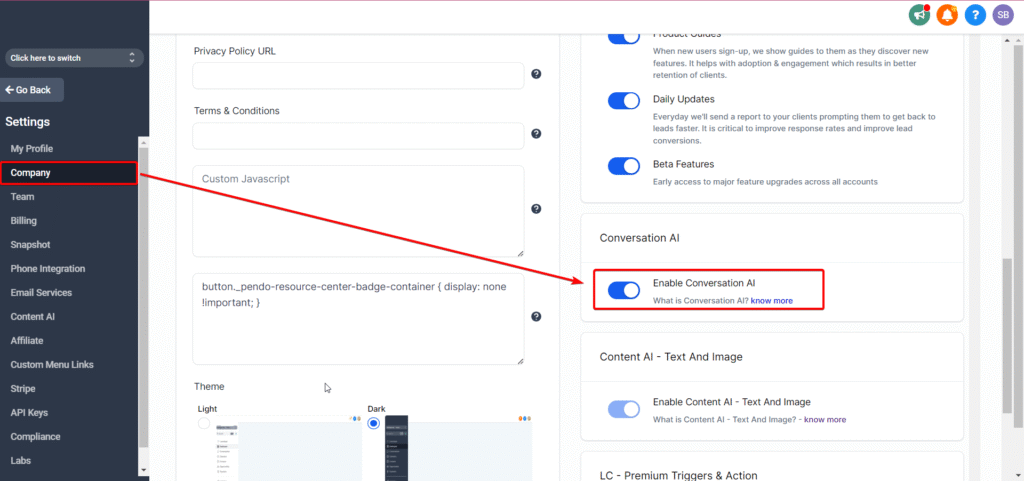
- Go to Sub-Account Settings → Conversation AI
- Switch the mode to autopilot.
- Train the bot with:
- Business FAQs
- URLs (for knowledge)
- Custom Q&A (for niche-specific prompts)
4. Add the Conversation AI action into your workflow using the “Ask Question” node.
5. Configure intents like:
- Appointment Booking
- Support/FAQs
💬 “Hey there! Thanks for messaging [Business Name]. Are you looking to book an appointment or get more info?”
Why It’s a Game-Changer
- Instant lead response = higher conversions
- Works 24/7—even when staff are asleep
- Reduces no-shows by confirming appointments automatically
- You can bill for AI usage per message (more on that below)
Campaign 2 AI Review Request & Reputation Builder
Purpose
Positive reviews = more bookings. Period. But most businesses forget to ask. With Reviews AI, you can automate the ask and the response.
How It Works
After a client interaction (like completing a service or appointment), send a friendly, AI-crafted message asking for a review. Based on the review, the bot will automatically respond with a custom message.
Snapshot Integration Example
- Trigger: Appointment status = “Completed”
- Action 1: Send SMS
“Thanks for visiting [Business Name]! Mind leaving a quick review?”
- Action 2: Trigger Reviews AI
Auto-reply on Google or Facebook
Use Suggestive or Auto-Pilot mode
Setup Steps
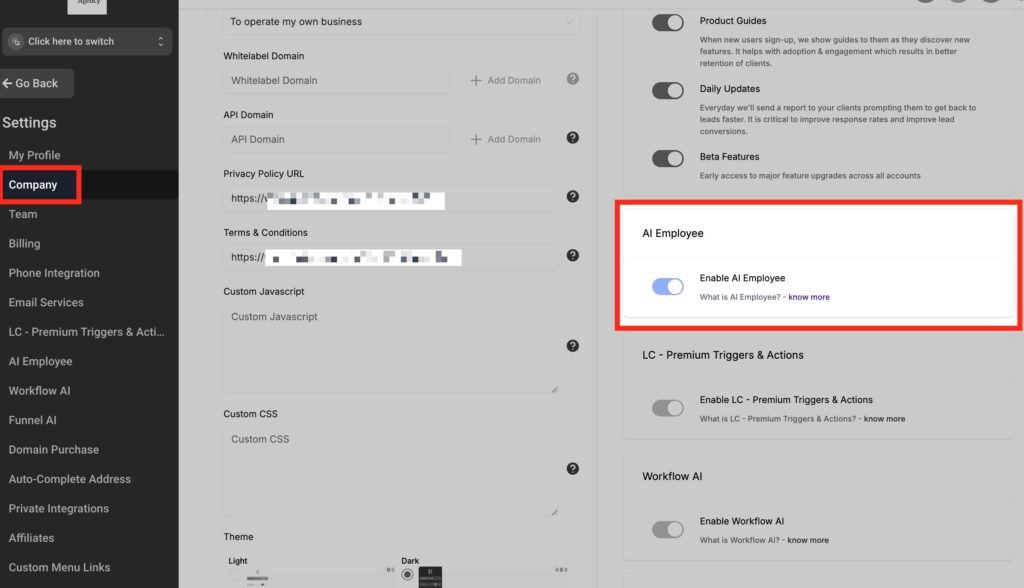
- Enable Reviews AI in your sub-account
- Create a workflow:
- Trigger: Appointment Completed or Tag Added
- Action: Send SMS → Include Google review link
3. Add Reviews AI to handle replies automatically
💬 “Thank you for the kind words, [First Name]! We’re thrilled to have served you.”
📌 Use review data to trigger testimonials or email follow-ups.
Why It’s a Game-Changer
- Increases 5-star review volume
- Eliminates manual responses
- Adds another white-labeled value-add for your SaaS offer
- Rebill for review replies per message
Campaign 3 Re-Engagement AI for Cold Leads
Purpose
Most pipelines leak. Leads come in, poke around, then go cold. Workflow AI helps re-engage them with human-like, personalized messages based on context.
How It Works
Workflow AI lets you embed ChatGPT-like prompts into your automations. You write the prompt → HighLevel generates a tailored message.
Snapshot Integration Example
- Trigger: Opportunity Status = Lost OR Last Activity > 14 days
- Action: Workflow AI
Prompt: “Write a friendly message to re-engage a cold lead who didn’t book a demo. Mention how [Business Name] can help and offer a link to reschedule.”
- Branching:
- If reply = Positive → Send booking link
- If reply = Negative → Tag as “Uninterested.”
Setup Steps
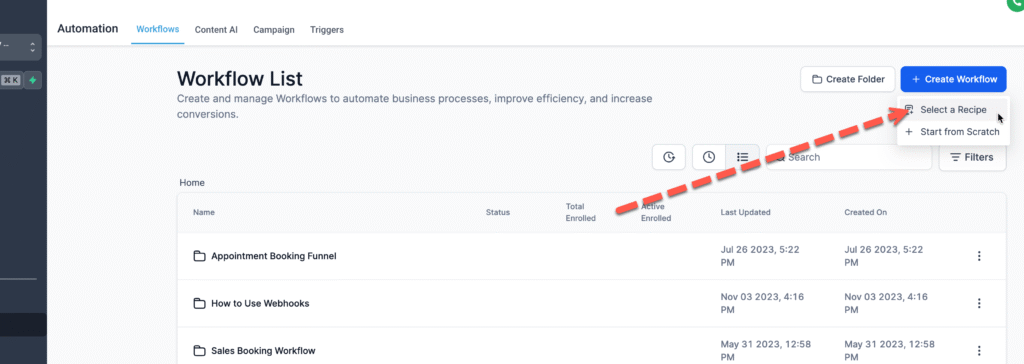
- Open Automation > Workflows > Create New
- Trigger: Last Activity over 14 days ago
- Action: Workflow AI
- Prompt Example:
- “Re-engage [First Name] about our [Service Type]. Mention benefits, address common objections, and invite to reschedule with [Booking Link]. Be friendly and human.”
- Add conditional reply filters for next steps
Why It’s a Game-Changer
- Converts lost leads without manual follow-up
- Delivers messages that feel personal, not robotic
- Great for sales nurture, abandoned cart, or ghosted consults
- Perfect for high-ticket service businesses
Monetize These Campaigns Using SaaS Mode
If you’re selling GoHighLevel in SaaS mode, AI is an upsell that pays for itself.
Here’s what you can bill clients vs. your actual cost:
| AI Tool | Your Cost (Est.) | Suggested Rebill |
|---|---|---|
| Conversation AI | $0.02 per message | $0.05–$0.10 per message |
| Workflow AI | Usage-based (OpenAI) | Included in premium tiers |
| Reviews AI | $0.08 per review | $0.25–$0.50 per review |
✅ Use the SaaS Configurator to package these features under Pro or Premium tiers.
✅ Automate rebilling under the $497 plan.
Frequently Asked Questions
Do I need to be technical to use Workflow AI?
No—but it helps. You’ll need to craft good prompts and understand logical branching. If you want simpler AI, start with Conversation AI.
Can I train AI to handle niche-specific questions?
What’s the difference between Workflow AI and Conversation AI?
Can I use AI campaigns for WhatsApp?
Conclusion
GoHighLevel gives you the keys to automation—but AI is the engine that helps you drive client results faster, smoother, and smarter.
By adding these three AI-powered campaigns to your SaaS snapshot:
- You boost lead engagement
- You capture more reviews (and improve your reputation)
- You bring cold leads back to life
Whether you’re building for medspas, agencies, coaches, or trades—these campaigns WORK.
Don’t wait. Build them into your snapshot, test them, and watch your clients rave about the “AI that closes deals for them.”