

You launched your SaaS snapshot… now what?
If you’re like most HighLevel users, you’ve invested time and money building your snapshot, pricing your tiers, and setting up onboarding. But how do you know if it’s actually working?
Simple. You calculate your ROI — Return on Investment.
In this guide, we’ll walk you through how to measure the ROI of your GoHighLevel SaaS snapshot, with step-by-step formulas, pricing breakdowns, real-world examples, and strategies to maximize your profitability.
What You'll Learn
- 📈 How to calculate ROI with simple formulas
- 🧮 Exact cost breakdowns of running SaaS mode
- 🧠 Real-world pricing tiers and profit models
- 🔁 How to rebill for LC Phone, AI tools, and support
- 🧰 Tools and automations inside HighLevel to track ROI
- 🧨 How to improve ROI through churn reduction, upsells, and onboarding
What is ROI in SaaS Mode?
In simple terms:
ROI = (Revenue – Costs) / Costs x 100
However, when we discuss GoHighLevel SaaS mode, you’re not just comparing ad spend to signups. You’re tracking:
- Snapshot creation and support time
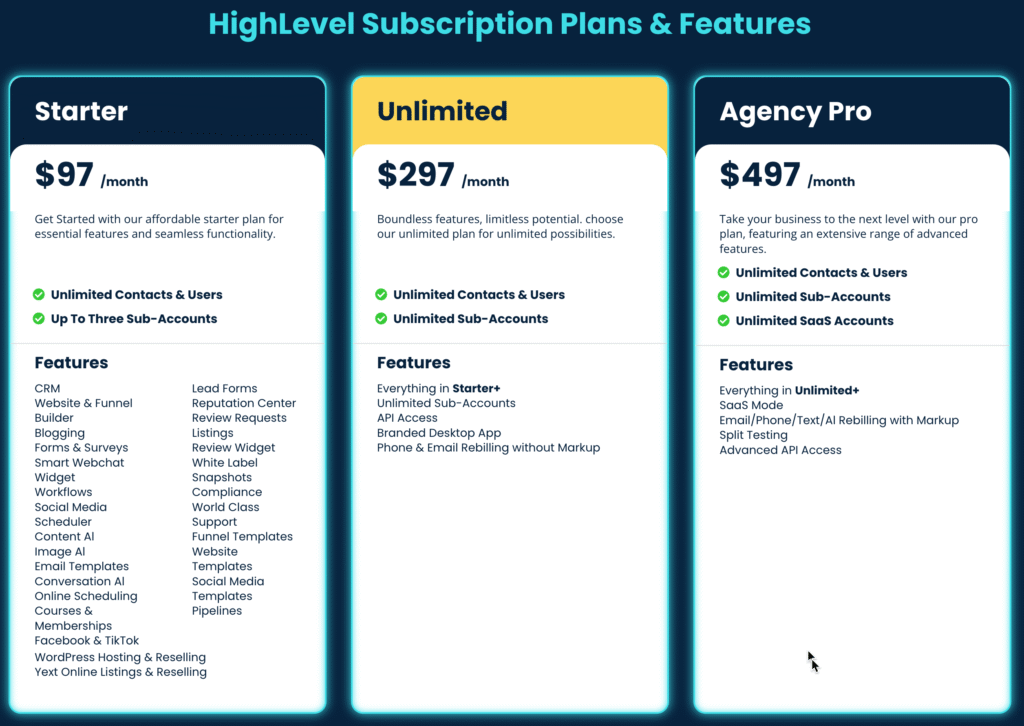
- GoHighLevel SaaS plan ($497/mo)
- Client MRR (monthly recurring revenue)
- Rebilling profits (calls, SMS, AI tools)
- Churn rate (loss of paying clients)
- Team costs (support staff, VA, or sales help)
Let’s plug this into something real.
SaaS Snapshot ROI Formula (With Numbers)
Let’s say you’re offering three SaaS plans with done-for-you onboarding and rebilling enabled.
💼 Example Business Setup:
| Plan | Price/Month | Clients | Monthly Revenue |
|---|---|---|---|
| Starter | $97 | 10 | $970 |
| Pro | $197 | 8 | $1,576 |
| Elite | $297 | 5 | $1,485 |
| Total MRR | — | — | $4,03 |
💸 Monthly Expenses:
| Expense | Monthly Cost |
|---|---|
| GoHighLevel SaaS Plan | $497 |
| LC Phone usage buffer | $100 (rebilled to clients) |
| Stripe Processing Fees (~3%) | $120 |
| Virtual Assistant or Tech Support | $400 |
| Zapier, Email, Hosting, Misc Tools | $60 |
| Custom Onboarding Video Tools | $40 |
| Total Monthly Costs | $1,217 |
🧮 ROI Formula:
ROI = (4031 – 1217) / 1217 x 100 = 231.2%
You’re generating over 2x ROI monthly. That’s fantastic. But that’s only the beginning.
How to Improve Your SaaS Snapshot ROI
Here’s where your snapshot can go from “good” to “insanely profitable.”
1. Raise Your Average Revenue Per Client (ARPC)
Most HighLevel resellers underprice their SaaS. With just a few upgrades, you can double your ARPC.
💡 Try These Add-Ons:
| Add-On | Avg Price | Effort Level |
|---|---|---|
| Additional Sub-users | $20–$50/mo | Low |
| AI Chatbot Configuration | $297 setup | Medium |
| Monthly Strategy Calls | $100–$300/mo | Medium |
| Custom Funnel Build | $497–$1497 | High |
| Reputation Management | $47–$97/mo | Low |
Even if just 20% of clients take a $97 upsell, that’s an easy $970/month added to your MRR.
2. Leverage Rebilling for Phone, AI, and Texting
You can rebill your clients for:
- 📞 Phone minutes
- 📲 SMS/MMS
- 🤖 Conversation AI
- 🧠 Workflow AI
- ✍️ Content AI
✅ Real LC Phone Pricing (US/Canada):
| Service | Your Cost | Suggested Rebill |
|---|---|---|
| Local Number | $1.15/month | $5–$10/month |
| Outbound Call | $0.018/min | $0.04/min |
| Inbound Call | $0.0085–$0.0220 | $0.03–$0.05/min |
| SMS (Outbound/In) | $0.0079/segment | $0.02–$0.03/segment |
Set usage limits in the SaaS Configurator and bill via Stripe.
✅ Pro Tip: Use the “Wallet” feature to automate top-ups and usage alerts. It’s passive income on autopilot.
3. Reduce Churn with Better Onboarding
If a client pays $297/month but leaves after 60 days, you’ve just lost $3,000 in lifetime value.
Ways to Reduce Churn:
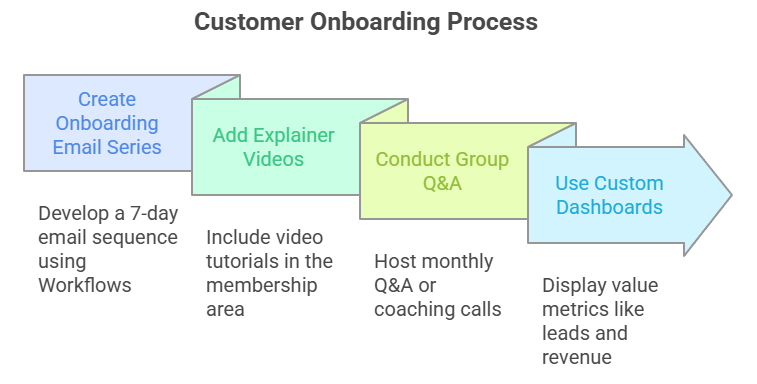
- 🧠 Create a 7-day onboarding email series using Workflows.
- 🎥 Add explainer videos in a membership area.
- 🎯 Run a monthly group Q&A or coaching call
- 📊 Use Custom Dashboards to show value (leads, revenue, reviews).
Even increasing average client lifetime from 3 to 6 months DOUBLES your revenue — without getting a single new customer.
4. Know Your Customer Acquisition Cost (CAC)
CAC = Total Spend on Sales/Marketing ÷ Number of New Clients
Example:
$1,000 in ads + $500 in sales rep = $1,500
10 new clients this month
CAC = $150/client
If your LTV is $1,200 per client, then:
ROI on Acquisition = (1200 – 150) / 150 = 7x ROI
🔁 Scale the winners. Kill the losers.
5. Use Tracking Tools to Stay Profitable
Set up tools and processes to make ROI tracking effortless.
🧰 Built-In Tools:
- 💳 Stripe: Revenue by client, churn rate
- 📞 Call/SMS Reports: Track usage by sub-account.
- 💡 Workflow Analytics: Conversion steps
- 👥 Client Portal: Add Google Sheets or embed ROI calculators
You can also create custom dashboards using HighLevel’s reporting widgets + Zapier or LeadConnector API.
Real-World ROI Scenario
Let’s say you invest in building a high-converting “Local Business Snapshot” and sell it in SaaS mode.
You charge:
- $197/month with no contract
- Onboarding fee of $297
- Upsell AI chatbot for $197.
- Rebill the LC phone at 2x cost.
A client stays for 6 months on average:
- MRR = $197 x 6 = $1,182
- Onboarding = $297
- AI Add-On = $197
- Total = $1,676 per client
If it costs you $200 to acquire each client (ads, time, tools), your ROI per client = (1676 – 200) / 200 = 738%
Frequently Asked Questions
How much should I charge for my SaaS plans?
What’s a healthy ROI for a SaaS snapshot?
How do I track costs like AI usage or phone calls?
Can I rebill automatically?
Do I need the $497 plan to access SaaS Mode?
Final Thoughts
Your GoHighLevel SaaS snapshot is more than a tool—it’s a business in a box.
But if you’re not tracking your ROI, you might be leaving thousands of dollars on the table each month.
📌 So here’s your action plan:
- Plug your numbers into the ROI formula.
- Set a goal for ARPC and client LTV.
- Add at least one high-margin upsell.
- Enable rebilling and automate everything.
- Revisit your snapshot pricing every 90 days.
The more you optimize, the more your SaaS runs like a true SaaS company—with predictable growth, recurring revenue, and scalable profit.